We decided to put Mercury’s API to the test to see if we could build something game-changing. The short answer is, “Yes!” Not only do you get up to $5M in FDIC insurance through their partner banks and sweep networks and a greater experience with Mercury, but now with Puzzle, you can get real-time financial statements, financial metrics like cash, burn, and runway. This is all automatically reconciled for the highest accuracy. That means you get complete financial data faster and more accurately than ever before by letting software automate work you or your bookkeeper used to do manually.

Puzzle x Mercury
Mercury’s API makes them a compelling banking platform partner — not just for founders — but for accountants and CFOs. Here are a few of the things we built at Puzzle leveraging Mercury’s API.*
One of the most time-consuming tasks in accounting is bank reconciliations. This is the process of matching transactions recorded in a company's accounting system with those recorded by their banking platform. The Mercury API makes this process much easier, enabling Puzzle to automatically compile a reconciliation for you to confirm ending balances in seconds. Among the accounting automations for startups, reconciliation is where founders reclaim the most hours.
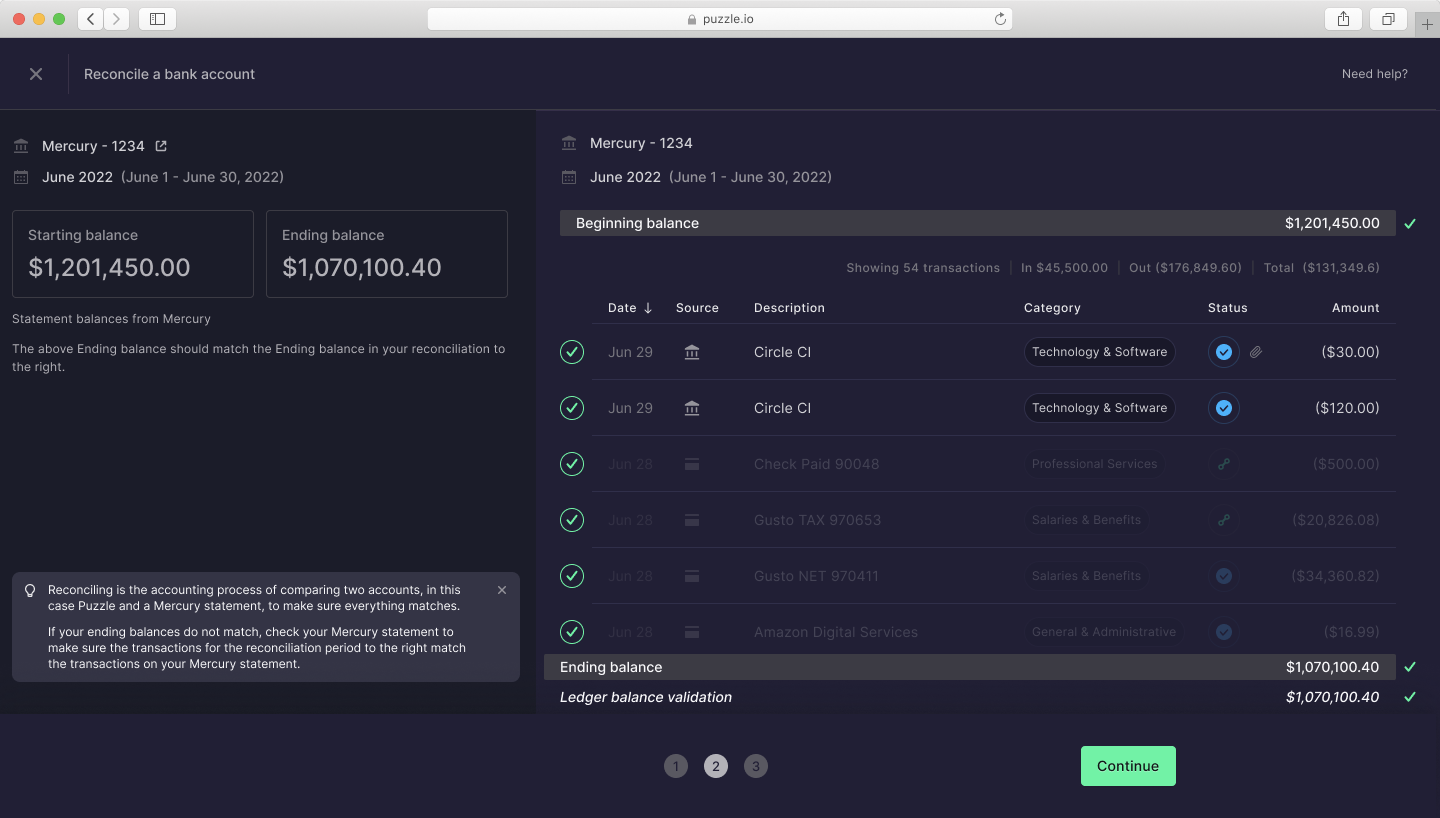
Mercury Statements in Puzzle
Another time-consuming task in accounting is importing pdf bank statements. The Mercury API can automate this process by importing monthly statements into Puzzle. We’re automatically pulling the API balance into your bank reconciliation to compare with the system balance. This means you won’t have to manually download your monthly statements from Mercury and save and upload them to each reconciliation each month. Your financials become more traceable and stronger in the case of an audit, be it by the IRS or your public accounting firm when you IPO. Bonus: we’re adding pdf import automatically as well, soon!
In addition to importing monthly statements, the Mercury API can also automate the import of memo information. This includes information such as transaction descriptions and notes. By automatically importing the memos, the API can help ensure that all relevant information is recorded. This can save businesses time and reduce errors, as there is no need for manual data entry or lengthy email confirmations.
Mercury API can also automate the import of Mercury Treasury** information. This includes information such as interest earned, withdrawals, and deposits. There is no need for manual data entry all while keeping your accounting as real-time as possible. You’ll have up-to-date cash, burn, and runway without lifting a finger.
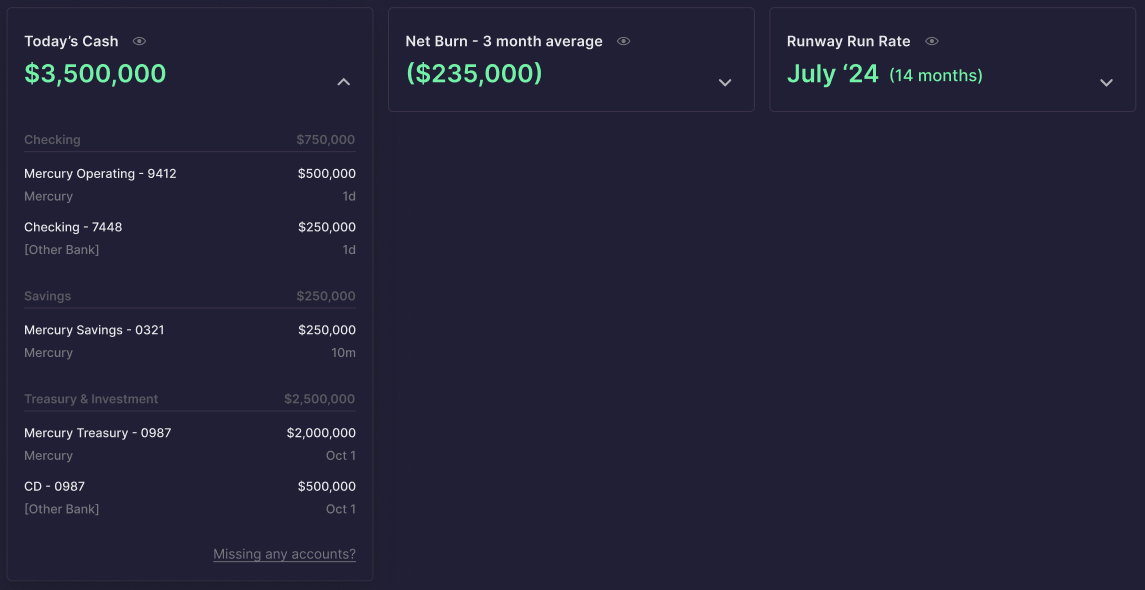
Puzzle FDIC Monitor
Finally, Mercury API can automate the import of credit card information. This includes information such as transaction descriptions, notes, and receipts. By automating the import of this information, the API can help ensure that all relevant information is recorded in the accounting system. This can save businesses time and reduce errors, as there is no need for manual data entry.
Mercury API is a powerful tool that can help businesses automate many of the tasks associated with accounting. By automating bank reconciliations, statement imports, memo imports, Mercury Treasury imports, and credit card imports, the API can save businesses time and reduce errors. As businesses continue to look for ways to increase efficiency, the Mercury API is likely to become an increasingly important tool for automating accounting processes.
Puzzle is the only accounting software built native to the Mercury API. Mercury customers can get Puzzle’s real-time financial statements and metrics here.
| Mercury API Feature | What It Automates | Key Benefit |
|---|---|---|
| Bank Reconciliations | Matches accounting system transactions with Mercury records; compiles reconciliation for confirmation | Eliminates manual matching; ending balances verified in seconds |
| Statement Import | Pulls monthly statements directly via API; syncs API balance to bank reconciliation | No manual PDF downloads; stronger audit trail for IRS or IPO reviews |
| Memo Import | Imports transaction descriptions and notes automatically | All context captured without manual data entry or email follow-ups |
| Mercury Treasury Import | Imports interest earned, withdrawals, and deposits from Treasury accounts | Up-to-date cash, burn, and runway with zero manual entry |
| Credit Card Import | Imports transaction descriptions, notes, and receipts from Mercury credit cards | Reduces errors; complete records without manual entry |
The Puzzle–Mercury integration has only gotten more valuable as the broader accounting landscape has shifted. With 80% of businesses planning to adopt real-time payments by 2026 and B2B real-time payment transactions up 63% year-over-year, the expectation that your books reflect what's actually in your bank account — today, not at month-end — has gone from a nice-to-have to a baseline requirement. Meanwhile, major accounting platforms like Xero and QuickBooks introduced usage-based API pricing in 2025–2026, raising the cost of third-party integrations for developers and, eventually, for users. Mercury's native API connection to Puzzle sidesteps that entirely: there's no intermediary layer metering your reads or adding per-tenant fees. You get the full transaction metadata — memo fields, Treasury account designations, counterparty data — delivered directly as transactions post, not on overnight batch schedules. If you're evaluating your Mercury Bank accounting integrations heading into 2027, that direct connection matters more now than it did when we first built it.
Two developments this year have made that connection even more consequential. In April 2026, Mercury received conditional OCC approval to establish Mercury Bank, N.A. — a structural shift that would give Mercury direct control over deposits and compliance rather than relying on partner banks. As of this writing, Mercury is in its bank organization phase, satisfying remaining requirements before final charter approval. For founders and finance teams, that matters: a chartered Mercury Bank would mean fewer intermediary layers between your cash and your API data, and stronger long-term stability for integrations built on top of it. Then in August 2026, Mercury launched Mercury Spend — a spend management layer built directly inside Mercury that auto-categorizes transactions to the correct budget and GL category at the point of purchase. If you're running Puzzle alongside it, you receive more pre-categorized transaction data through the API before it ever touches your general ledger, which means less review work and a faster month-end close. Both changes point in the same direction: the gap between your bank and your books keeps narrowing, and the integrations built natively on the API — not through middleware — are the ones positioned to capture every bit of that signal.
In August 2026, Mercury Treasury introduced two exclusive mutual funds — MCRYX (an ultra-short bond fund managed by Morgan Stanley Investment Management) and MRGXX (a government money market fund managed by State Street Investment Management) — available only through Mercury Treasury accounts. If you hold idle cash in Treasury alongside your operating accounts, this matters for your books. Standard bank feeds often merge Treasury and operating transactions into a single import stream; Puzzle's native API connection separates them automatically, routing each to the correct GL account. As Mercury's Treasury product expands, the gap between what a bank feed delivers and what a direct API connection delivers keeps growing. More products mean more transaction streams — and more ways for a middleware-heavy integration to lose context that a native connection preserves.
Modern accounting software like Puzzle uses AI-native categorization engines that read transaction metadata — merchant names, memo fields, amounts, counterparty data — and map each transaction to the correct account in your chart of accounts without manual input. When you connect Mercury via API, Puzzle pulls full transaction metadata (including memo text and counterparty details) directly as transactions post, not on overnight batch schedules. The AI applies learned categorization rules across your transaction history, and because Puzzle maintains dual-basis books (cash and accrual simultaneously), a categorized transaction updates both your cash position and your accrual-basis P&L in real time. For transactions the AI isn't certain about, you review and confirm — the categorization suggestion is already there, so it takes seconds rather than minutes. Over time, the model learns your specific chart of accounts structure and improves accuracy across your transaction volume.
Puzzle connects to Mercury via their API, so only the accounts you explicitly authorize are pulled in. If personal and business accounts share the same login, you can select which accounts to sync during setup and deselect any that don't belong. If a transaction is imported incorrectly, you can exclude or delete it directly inside Puzzle — it won't affect your Mercury account, only your accounting records.
Tracking ARR, MRR, and net revenue retention inside your accounting software requires two things: a clean chart of accounts that separates recurring revenue from one-time fees, and a live bank feed that keeps your data current. With Puzzle connected to Mercury via API, your revenue transactions post in real time — no waiting for month-end imports. Puzzle's financial metrics layer sits on top of that live data and surfaces cash, burn rate, and runway automatically. For SaaS-specific metrics like ARR and MRR, Puzzle reads your recognized revenue line and computes period-over-period recurring revenue figures without requiring a separate analytics tool. Net revenue retention — which measures expansion, contraction, and churn against your starting MRR cohort — can be tracked by mapping customer-level revenue to the correct accounts and reviewing the metric dashboard Puzzle maintains alongside your real-time books. Because Puzzle reconciles your Mercury transactions automatically, the underlying data feeding those metrics is always accurate and audit-ready. Founders evaluating their broader setup can also review Mercury bookkeeping software for startups to see how the options compare.
Yes. In addition to the live Mercury API connection, Puzzle supports PDF statement imports as a fallback — useful for historical periods before you connected the integration or for accounts without a live feed. Puzzle's automated categorization engine applies the same logic to imported transactions regardless of source, so manual data entry stays minimal even without a real-time connection.
The moment you open a bank account — even before revenue or funding. Every transaction you skip capturing is a gap you'll have to reconstruct later, and reconstructing historical books from a cold start is expensive. Connecting Puzzle to Mercury from day one means your chart of accounts, burn rate, and beginning balances are clean when your first investor asks for financials. The cost of setting this up early is an hour. The cost of ignoring it until your Series A due diligence is weeks of a bookkeeper's time and real dollars in catch-up fees.
Puzzle is fully self-serve. Connecting your Mercury account via API takes a few minutes: authorize the integration, select the accounts you want to sync, and Puzzle starts pulling transactions automatically. Most founders are set up and reviewing real-time financials the same day. If you prefer a guided walkthrough, onboarding support is available — but it's not required.
The core stack is a live bank feed connected to an AI-native accounting platform, layered with a financial metrics dashboard and a document management layer for investor reporting. For startups banking with Mercury, connecting Mercury's API directly to Puzzle is the foundation: transactions post in real time, Puzzle reconciles them automatically, and your client's burn rate, runway, and cash position update without anyone logging in to run a report. That gives you something to show a client at any point in the month — not just after close. On top of that, most fractional CFOs add a cap table tool (Carta or similar) and a revenue data source (Stripe for SaaS, Square or Shopify for commerce) to round out the financial picture. The tools that don't belong in this stack: ERP systems designed for 200-person companies, or cash-flow forecasting tools that pull from stale month-end exports rather than a live feed. At the early-stage and growth-stage levels where most fractional CFOs operate, right-sized tooling — automated accounting, real-time metrics, and a clean audit trail — delivers more insight per dollar than enterprise software deployed at a fraction of its capability. For a deeper look at how these pieces fit together, see the startup banking stack accounting tools guide. Puzzle's partner program is built specifically for fractional CFOs and accounting firms managing multiple Mercury-connected clients: a single firm dashboard, multi-client workflows, and direct partner support.
A Delaware C-Corp SaaS startup needs a chart of accounts that separates recurring revenue from one-time fees, maps to GAAP accrual treatment, and is clean enough to survive a Series A due diligence review. The core structure: Revenue — split into at least two lines: Subscription Revenue (recurring MRR/ARR) and Professional Services or One-Time Revenue. Do not lump these together; investors and acquirers will always ask for the split. Cost of Revenue (COGS) — hosting and infrastructure, customer support costs, third-party software directly tied to delivery. This is what drives your gross margin line, so precision here matters. Operating Expenses — broken into Sales & Marketing, Research & Development, and General & Administrative. Each maps to a GAAP presentation line and to how investors benchmark your unit economics. Other Income/Expense — interest income (relevant if you hold Mercury Treasury), interest expense, and any foreign exchange gains/losses. A few SaaS-specific callouts: if you take annual prepayments, you need a Deferred Revenue liability account to recognize revenue ratably over the subscription term — otherwise your books overstate revenue in the month cash lands. If you grant equity, you'll need a Stock-Based Compensation expense line in each opex bucket by grant-date when you start recognizing it. Puzzle's chart of accounts is pre-built for Delaware C-Corps and SaaS startups using Stripe and Mercury: the accounts are structured so that your cash-basis view (daily burn and runway from your Mercury feed) and your accrual-basis P&L (what you show investors and your CPA) stay in sync without maintaining two separate ledgers.
Puzzle's AI Close agent runs your month-end checklist automatically — categorizing transactions, flagging anomalies, reconciling balances, and surfacing items that need your review. Rather than replacing your judgment, it does the mechanical work so you approve before anything is finalized. AI credits are consumed as the agent processes tasks during a close; your plan determines how many credits are available per month. Templates and pre-built close workflows are available so you're not configuring from scratch — the agent picks up where your Mercury feed leaves off. If you want to compare accounting automation tools for startups more broadly, see how the leading options stack up. For a deeper comparison of financial close automation software, see how Puzzle stacks up against other tools.
Yes. Puzzle's real-time financial metrics layer tracks revenue, gross margin, and net cash flow as transactions post — not at month-end. For e-commerce and digital product businesses, connecting Mercury alongside payment processors (Stripe, for example) gives you a unified view of revenue in and operating costs out. Because Puzzle maintains dual-basis books simultaneously, you can watch cash-basis revenue daily while staying accrual-compliant for taxes and investor reporting — without running two separate ledgers.
Migrating from QuickBooks starts with establishing a clean cutover date and importing your trial balance as beginning balances in Puzzle. Historical transactions before that date stay in QuickBooks as a read-only archive — you don't need to re-enter years of history. From the cutover date forward, Puzzle's Mercury API connection takes over, pulling transactions automatically and reconciling them against your opening balances. If you need historical transaction detail in Puzzle, the PDF import and CSV upload paths let you bring in prior-period statements without a live feed. Founders evaluating their stack can also compare real-time accounting software options to understand how Puzzle fits different growth stages.
Direct business customers get self-serve access and can be fully set up in a day. Accounting firm partners go through a dedicated onboarding track — including access to Puzzle's firm dashboard for managing multiple client books, partner-specific training, and a direct line to the partner support team. Firms aren't deprioritized; the tracks are simply different because the workflow is different: a firm managing 20 Mercury-connected clients needs multi-client tooling and bulk workflows that a single-entity founder doesn't.
Accounting firms are replacing manual data entry workflows with AI-native integrations that pull transaction data directly from banking platforms via API. Instead of a bookkeeper manually downloading statements, uploading CSVs, and keying in memo descriptions, the AI reads the raw transaction feed — including counterparty names, memo text, and account designations — and proposes categorizations automatically. Firms using Puzzle with Mercury eliminate the three most time-consuming manual steps: statement downloads, memo transcription, and reconciliation matching. The Mercury API feeds transaction metadata directly into Puzzle as transactions post; Puzzle's categorization engine proposes the correct account mapping; the accountant reviews and confirms rather than entering data from scratch. For firms managing multiple startup clients, this compounds — each client's Mercury account reconciles automatically, and the firm's time shifts from data entry to advisory work. That's the structural change AI enables: not removing the accountant, but moving their time up the value chain.
* Mercury is a fintech company, not an FDIC-insured bank. Banking services provided through partner banks Choice Financial Group and Column N.A., Members FDIC. Deposit insurance covers the failure of an insured bank. Deposits in checking and savings accounts are FDIC-insured through Choice Financial Group and Column N.A. and their Sweep Program Network Banks. Certain conditions must be satisfied for pass-through insurance to apply. Learn more here.
** Mercury Treasury is offered by Mercury Advisory, LLC, an SEC-registered investment adviser ("Mercury Advisory"). All brokerage and clearing services are provided by Apex Clearing Corporation, an SEC-registered broker-dealer and member FINRA/SIPC. Treasury accounts are not FDIC insured, are not bank deposits, and are not guaranteed by Choice Financial Group or Column N.A., and may lose value. Please see full disclosures at mercury.com/legal/disclosures/treasury. Mercury Advisory is a wholly-owned subsidiary of Mercury Technologies, Inc.