Running month-end close manually means your team reviews accounts, drafts accruals, and flags variances in a scramble at the end of every period, even though your fintech stack (Stripe, Mercury, Ramp, Gusto, Brex) feeds transaction data in continuously. The batch close model wasn't designed for real-time data, and holding everything in a queue until day 30 just makes the pile bigger. AI agents for accounting change the rhythm: they process transactions as they arrive, flag exceptions immediately, and keep books current daily, so by the time month-end arrives most of the close work is already done. Accounting firms using AI agent workflows report close time reductions up to 50%, but only when the workflow includes structured human approval gates where your accountant reviews the output before anything posts to the books. We'll show you how to build a four-stage agent workflow for month-end close with approval gates at each stage, so AI handles the volume and your team keeps control of what hits the financials.
TLDR:
AI agents are software programs that can reason through multi-step tasks, take actions, and adapt based on what they find, without waiting for a human to push each step forward. In accounting, that means an agent can pull transaction data, apply categorization rules, flag anomalies, and hand off a reconciliation summary, all as part of a single automated sequence.
The distinction worth understanding is between AI assistants and AI agents. An assistant answers questions or generates content when you ask. An agent executes a workflow: it has a goal, a set of tools it can call, and the ability to decide what to do next based on intermediate results.
For month-end close, that architecture matters. The close involves dozens of dependent steps across different data sources. An agent can hold the thread across all of them.
There are a few core capabilities that make agents useful here:
The human-in-the-loop piece is what separates this from fully autonomous accounting. The agent does the work; your accountant reviews and approves before anything is finalized.
Traditional accounting automation follows rules. A rule-based system might auto-categorize a Stripe payment as revenue or flag a transaction that exceeds a threshold. That works fine until something falls outside the rule.
AI agents work differently. They reason through ambiguity, pull context from multiple sources, and take sequences of actions to complete a task instead of waiting for a human to move the process forward.
There are a few ways this shows up in practice:
The distinction matters for month-end close because that process is full of judgment calls, not simple rule applications. Matching intercompany transactions, deciding how to classify an edge-case expense, or flagging an accrual that looks off relative to prior periods all require reasoning, not pattern-matching.
That said, reasoning without oversight is a real risk in accounting. The most defensible AI agent workflows keep a human in the review loop before anything posts to the books. AI does the legwork; your accountant makes the final call.
AI agents for month-end close handle the specific tasks that eat the most time during a close cycle: transaction categorization, account reconciliation, accrual posting, and variance detection. Finance teams using AI agents for accrual reversals and transaction matching close faster while maintaining full control over what posts to the books.
Here is what each of those looks like in practice:
The agents surface work; accountants make the calls. Every flagged item, drafted entry, and reconciliation exception goes through a review step before it touches the books. This is the core difference between AI agents that assist and fully autonomous tools that act without oversight. Accounting firms working with startups still own the judgment layer: they interpret the variances, approve the accruals, and sign off on the close.
That division of labor matters for accuracy and for audit trails. When something is wrong, you need to know whether the AI flagged it or missed it, and who approved what and when. Agents that log every action make that traceable in a way that a spreadsheet never could.
AI agents work best in accounting when they're wired into a repeatable sequence. Here is how a well-designed workflow breaks down across the four stages of month-end close.
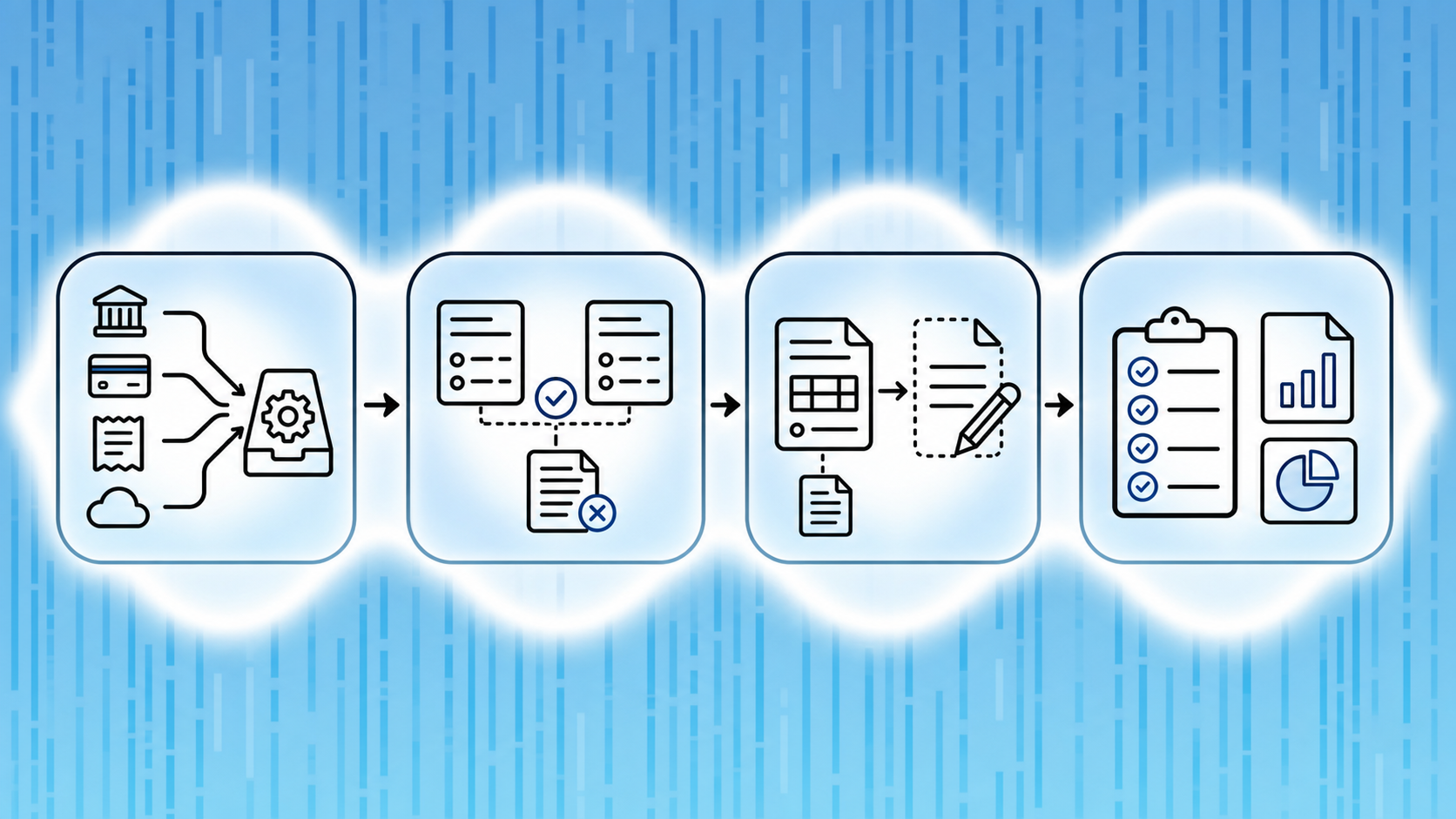
The first agent pulls transactions from your fintech stack (Stripe, Mercury, Ramp, Brex, Gusto) and categorizes them against your chart of accounts. AI-native tools can automate 85–90% of this categorization, leaving your team to review exceptions instead of processing every line.
A second agent matches bank feeds against your general ledger, flags discrepancies, and queues them for human review. What used to take two hours can run in about five minutes.
This stage is where AI agents earn their keep on complexity. The agent scans for unbooked accruals, deferred revenue entries, and prepaid amortization, then drafts journal entries for accountant approval before anything posts.
The final agent runs your close checklist on a schedule, checks that every task is complete, and generates a reporting package with real-time burn rate, runway, and ARR figures. Nothing gets signed off until a human reviews the output.
The sequence matters because each stage feeds the next. Errors caught in Stage 1 do not compound into Stage 3. That is the real benefit of a structured agent workflow: the AI does the work, but accountants stay in control of what hits the books.
Good agent instructions are specific enough to act on but flexible enough to handle the messy reality of real financial data.
Start by describing the agent's scope in plain terms: which accounts it owns, what time window it covers, and what a "done" state looks like. An agent told to "close the books" will do something very different from one told to "match all bank transactions in Mercury and Ramp to their corresponding GL entries for May, flag any item over $500 with no receipt, and stop before posting journal entries."
Write your agent workflows with these three elements clearly spelled out:
A workflow without a defined handoff is just automation with no visibility into what it decided.
Autonomous AI agents that act without checkpoints create real risk in accounting. A misclassified journal entry or an incorrectly account can compound across the close cycle, and by the time a human reviews the output, the errors are already baked into your financials.

The fix is building approval gates directly into your agent workflow before any output touches your books.
Not every step needs human review, but a few do without exception:
Human-in-the-loop review works best when the agent surfaces its reasoning alongside the output. If an agent posts a $14,000 accrual for software subscriptions, the reviewer should see which contracts drove that number and what recognition logic was applied, the resulting debit and credit.
Build your workflow so agents produce a reviewable audit trail at each gate: the input data, the rule or logic applied, and the resulting action. This gives your accountant or controller the context to approve quickly or push back with precision.
The goal is speed without blind trust. Your team approves the work; the agent handles the volume.
Traditional month-end close runs on a batch model: transactions accumulate for 30 days, then the accounting team scrambles to categorize, and report everything in a compressed window. That crunch is where errors compound and where founders get financial visibility weeks after the fact.
A continuous close flips that rhythm. AI agents process transactions as they arrive, flag exceptions in real time, and keep reconciliations current throughout the month. By the time day 30 arrives, most of the work is already done. Continuous accounting delivers real-time insights that empower finance leaders to influence strategic decisions instead of waiting weeks after month-end.
The batch close was designed around manual data entry and paper records. Startups running on modern fintech stacks (Stripe, Mercury, Ramp, Brex, Gusto) generate transaction data continuously, so holding that data in a queue until month-end just creates a larger pile to sort through later.
| Batch Close (Traditional) | Continuous Close (AI Agent) |
|---|---|
| Transactions accumulate for 30 days | Transactions processed as they arrive |
| Reconciliation runs once at month-end | Reconciliation runs daily |
| Errors caught on day 31 | Errors flagged in real time |
| Financial data 30+ days old mid-month | Books current daily |
| Accounting team in catch-up mode last week of month | Most close work done by day 30 |
| Close takes days | Close takes hours |
AI agents categorize each transaction at ingestion, match it against open invoices or expected charges, and surface anything that needs human review. Your books stay current daily. Reconciliation becomes a short confirmation step instead of a multi-hour reconstruction.
The result: month-end close shrinks from days to hours, and your financial data reflects where the business actually stands right now.
AI agents handle three specific jobs in the month-end close better than any manual process: transaction reconciliation, journal entry drafting, and variance analysis.
Agents pull transaction data from your connected accounts (Stripe, Mercury, Ramp, Brex, Gusto) and match records automatically, flagging only the exceptions that need a human decision. What typically takes a bookkeeper two hours runs in roughly five minutes.
Agents draft accruals, prepaid amortizations, and recurring entries based on rules you set once. Your accountant reviews and approves before anything posts to the general ledger.
Agents compare actuals against budget line by line, surfacing the gaps worth investigating so your team spends time on the explanation, not the arithmetic.
Teams adopting AI agents for accounting often ask the same question: if the AI handles categorization, reconciliation, and close prep automatically, what role does the accountant actually play?
The answer is the most important one in the workflow: approval.
AI agents are fast and accurate at pattern recognition, but financial records carry legal and fiduciary weight. A miscategorized transaction that goes unreviewed affects far more than one line item. It compounds across your income statement, balance sheet, and tax filings.
Well-designed AI agent workflows for accounting build review gates into every stage, at the end. Each agent surfaces its work before it is committed. Your accountant sees what changed, why the AI made that call, and whether it matches the underlying source documents.
This matters especially at month-end close, where the stakes are higher:
The strongest AI accounting workflows treat accountants as decision-makers, not merely exception-handlers. The AI does the volume work. The accountant brings the expertise that catches what the AI cannot see on its own.
Switching from spreadsheets and manual reviews to an AI agent workflow rarely goes wrong in one dramatic way. It tends to go wrong in several small, predictable ones.
Start with one repeatable, well-defined task, such as bank reconciliation or recurring journal entries, and run the agent in parallel with your existing process for at least one close cycle. Compare outputs. Only expand scope once you trust the outputs on that first task.
If you're using accounting software built for startups, like Puzzle, the agent layer should connect directly to your live general ledger exporting to a separate tool. That keeps your books as the single source of truth and cuts out the reconciliation step that catches up on stale exports. Book a demo to walk through how Puzzle structures review gates and agent workflows for accounting firms.
The choice comes down to three variables: your team's technical capacity, the complexity of your books, and how much ongoing maintenance you can realistically absorb.
Building with general AI tools like Claude or ChatGPT, paired with custom code, offers real flexibility. You can wire agents into any data source, define your own logic, and extend workflows as your needs change. What those tools lack is accounting domain knowledge: GAAP conventions, reconciliation logic, and audit trail requirements are not baked in. You build that layer yourself, or you leave gaps in your close process that compound over time.
Buying a purpose-built solution trades flexibility for speed and correctness. Accounting-specific AI agents come with that domain logic already embedded, which matters when a misclassified entry affects your burn rate or a reconciliation error surfaces during due diligence.
A few questions worth answering before you decide:
If your answers lean toward "no bandwidth" and "real complexity," buying almost always wins at the startup stage. The build option makes more sense for teams with dedicated financial engineering resources and workflows that are genuinely too custom for any off-the-shelf tool to handle.
Puzzle's AI Close is built for the month-end close workflows that accounting firms run on behalf of startup clients. Where most AI accounting tools ask you to adapt your process to fit their system, Puzzle builds the agent workflow around how close actually works: a structured sequence of dependent tasks, each requiring human sign-off before the next begins.
The workflow moves through four stages, with AI handling the work and your team approving the output at each checkpoint.
Firms running Puzzle's AI Close report up to a 50% reduction in close time per client. At scale, that difference shows up directly in margin: the same team handles more clients without adding headcount.
Puzzle partners with accounting firms exclusively and has no direct-to-business bookkeeping offering, so there is no channel conflict. The workflow is designed to make your team faster and your advice sharper, not to route around you.
AI agents don't replace accountants; they free them up to do work that actually moves the business forward. The categorization, reconciliation, and variance detection all run automatically, but every output still needs a human sign-off before it touches the books. The firms gaining margin are the ones that figured out how to keep the expertise in-house while automating everything else.
FAQ
AI assistants answer questions when you ask them; AI agents execute multi-step workflows without waiting for you to push each step forward. In accounting, that means an agent can pull transaction data, apply categorization rules, flag anomalies, run reconciliations, and surface a summary for your approval, all as part of one automated sequence. The agent holds the thread across dependent tasks; you review and approve the output before anything posts to the books.
No, and that's by design. The strongest AI agent workflows for accounting keep humans in the approval loop at every stage where judgment matters: journal entry creation, intercompany eliminations, and any flagged exception. The agent does the volume work, categorizing transactions, matching records, drafting accruals, but your accountant or controller reviews the output and approves before anything touches your general ledger. Speed without blind trust is the goal.
Buy purpose-built accounting software with agent workflows already embedded instead of building custom agents with general AI tools. Custom builds give you flexibility but require ongoing engineering bandwidth and force you to code accounting logic (GAAP conventions, reconciliation rules, audit trails) from scratch. Purpose-built solutions like Puzzle ship with that domain knowledge baked in, which cuts setup time and prevents costly errors during close. If your team lacks dedicated financial engineering resources and your books have real complexity (multi-entity, accrual, revenue recognition), buying wins at the startup stage.
Firms running AI agent workflows report up to 50% reduction in close time per client, with bank reconciliations running up to 96% faster (two hours down to five minutes). One client using Puzzle's AI Close cut month-end close time by 90%. The savings compound when transaction categorization runs continuously throughout the month piling up at month-end, so by day 30 most of the work is already done.
Continuous close wins for startups running on modern fintech stacks (Stripe, Mercury, Ramp, Brex, Gusto) because transaction data flows in daily, not monthly. AI agents categorize and as transactions arrive, flag exceptions in real time, and keep your books current throughout the month. Errors caught on day two are easier to fix than errors caught on day 31, and founders get financial visibility when decisions actually matter, not weeks after month-end when it's too late to course-correct.