What's New at Puzzle (Bookkeeper Edition) – September 2026
Product Updates
What's New at Puzzle (Bookkeeper Edition) – September 2026
We wanted to share 15 of the new features we have and will be shipping to make bookkeeping more accurate, faster, and hopefully more enjoyable on Puzzle. If you would like to see a sneak peak of any of these, let us know.
Sasha Orloff
9.18.24
In article:
Accounting. Simplified
A bad product lacks competitive advantage. Successful businesses have something unique that's hard to copy. It could be cost efficiency, brand power, or proprietary tech. Without this, you're just waiting to get outperformed. Think of physical retailers being outperformed by e-commerce.
Thank you for being part of our Puzzle community. Stay tuned!
Oops! Something went wrong while submitting the form.
We wanted to share 15 of the features we've shipped to make bookkeeping more accurate, faster, and hopefully more enjoyable on Puzzle. If you would like to see a sneak peek of any of these, let us know.
TLDR:
Dashboard load time dropped from 15s to 3s, and the reconciliation page now handles up to 1,000 transactions without timeouts.
Controllable automation settings let you choose exactly which bookkeeping tasks the AI handles and which you review yourself.
Generate Stripe receivables workpapers in Excel monthly, with anomaly alerts built into the Monthly Checklist.
Five new reports (invoices, bills, Stripe reconciliation, transactions, financial statements) now export in CSV, Excel, and PDF.
Top five things to make you faster 🚄
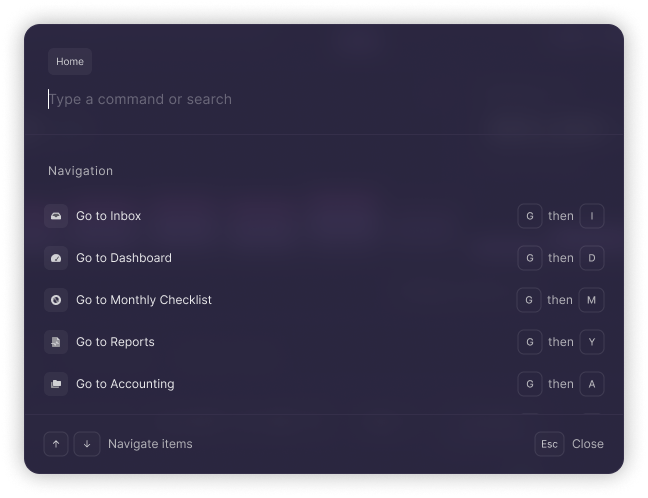
Command + K and keyboard shortcuts
Status: Live
Hit Cmd+K to get to where you need to go faster, without lifting your hands off the keyboard. Shortcuts already cover transactions, reconciliations, and report navigation, with more on the way.
Puzzle's Command + K Menu
Performance improvements
Status: Live
Dashboard: Reduced average load time from 15s to 3s.
Reconciliation page: Improved to efficiently handle up to 1,000 transactions at a time. No more timeouts.
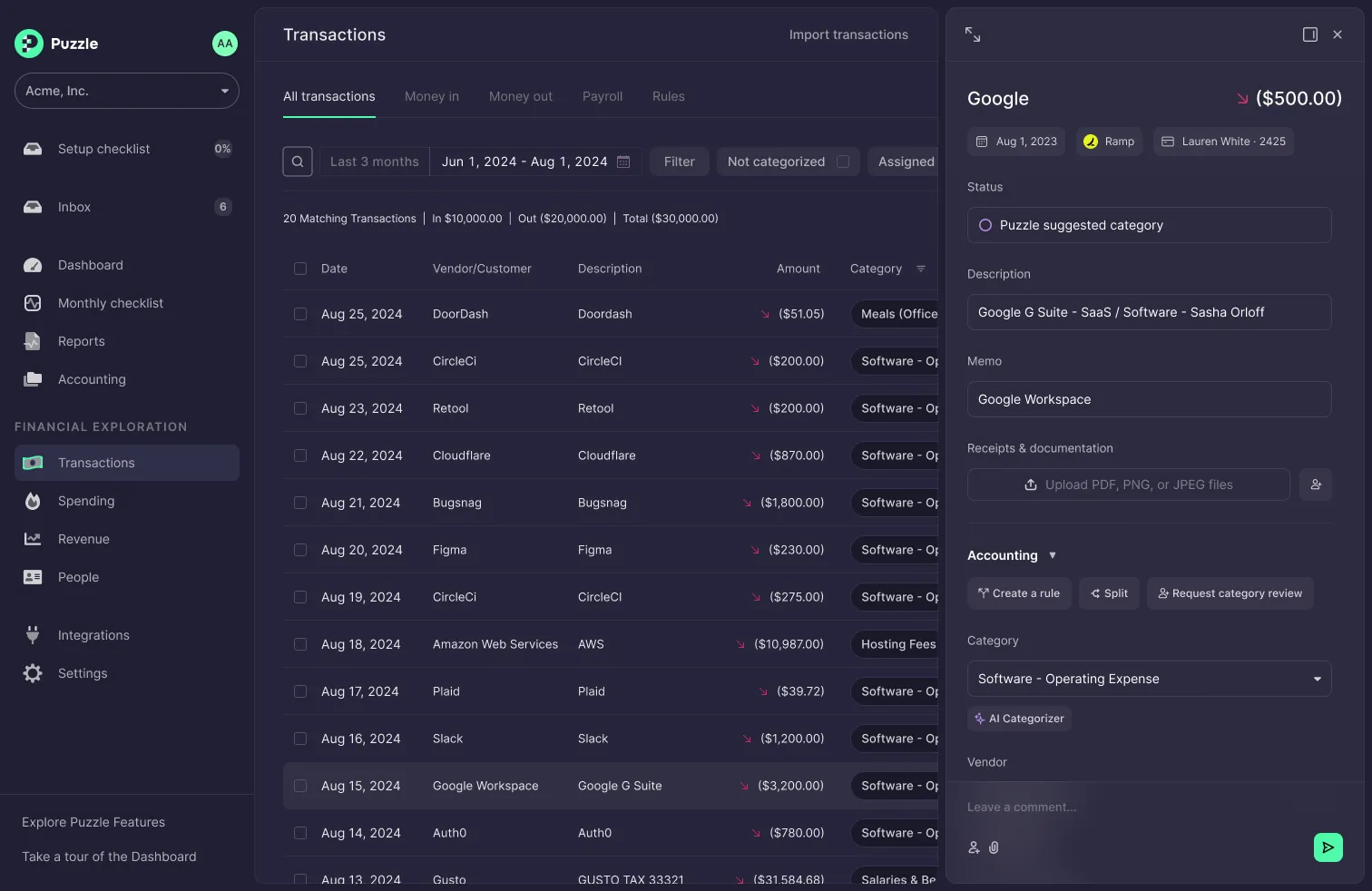
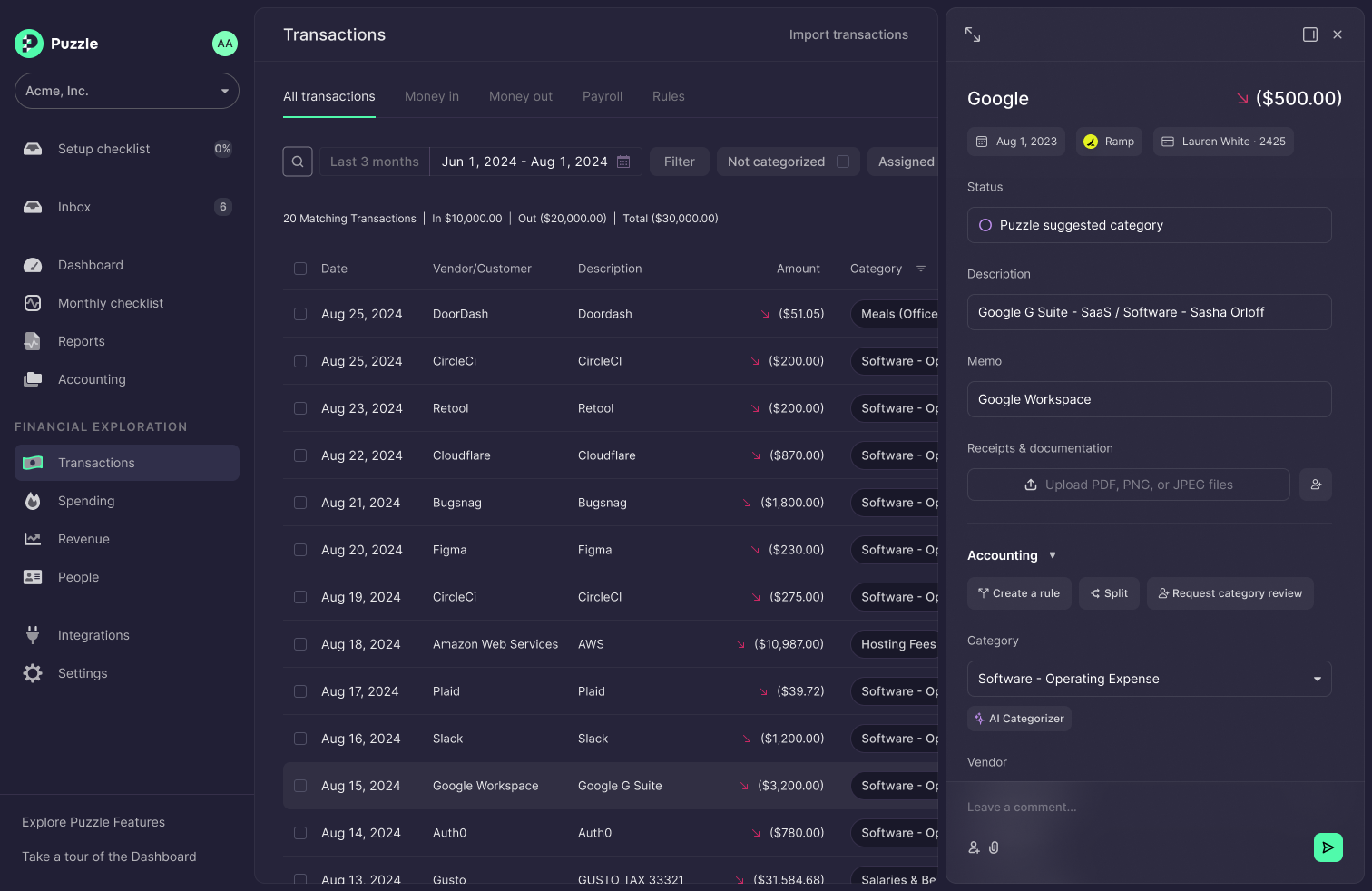
Transactions page improvements
Status: Continuously improving
Batch categorization and finalization
Search improvements: Search across vendors, descriptions, amounts (in testing)
Sorting of all columns (in testing)
Transaction details panel slides out instead of overlaying (in testing)
General UX improvements to help you get your work done more efficiently (in testing)
Improved Transactions Panel
Bookkeeper-focused navigation improvements
Status: Live
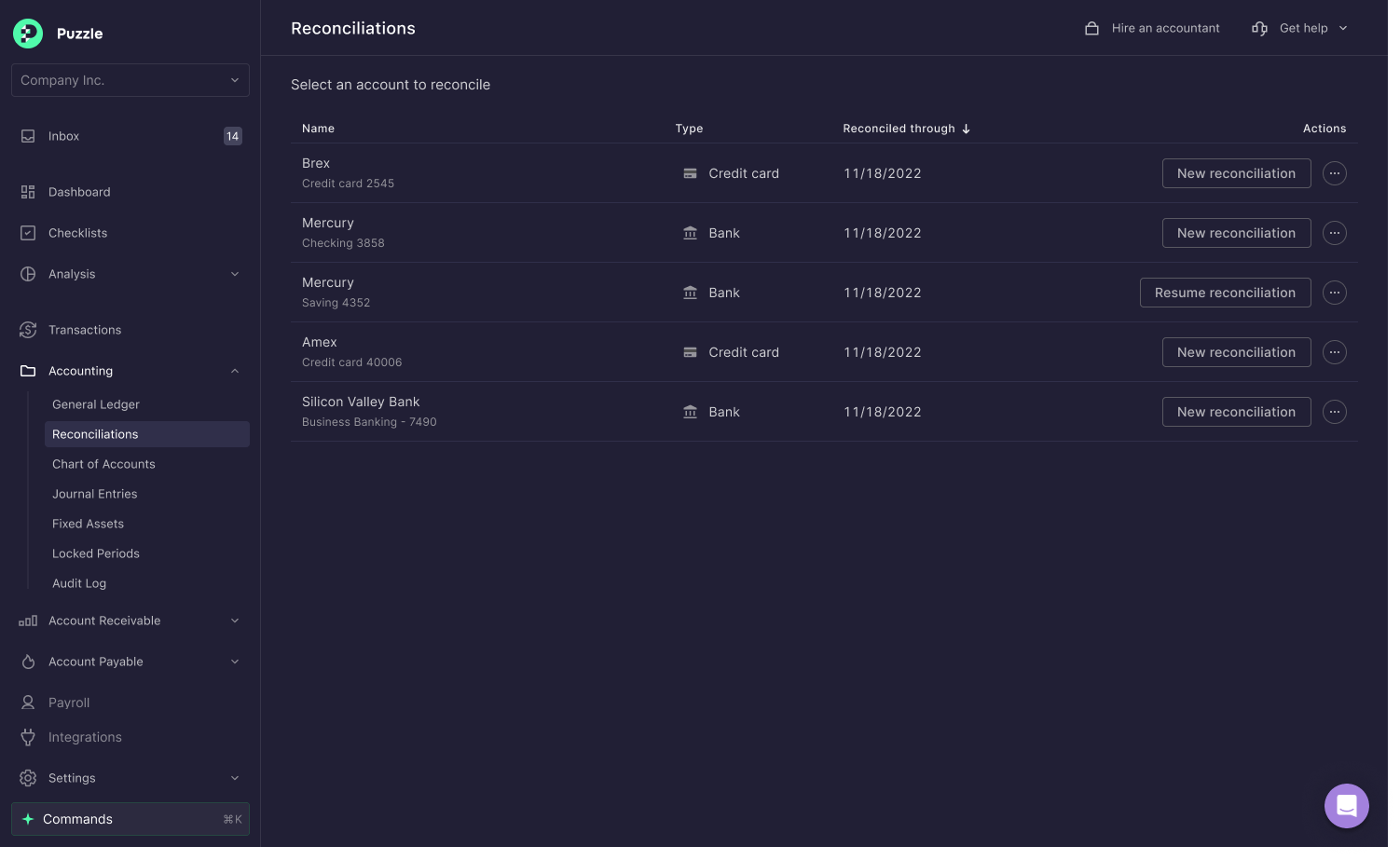
In addition to the Command+K shortcut, a refreshed navigation structure lets you access the most common accounting workflows directly from the left sidebar (Accounts Receivable, Accounts Payable, Reconciliations, Locked Periods, and more) far more efficiently than before.
Bookkeeper focused navigation sidebar
Controllable automation settings
Status: Live
Controllable automation settings let you pick which bookkeeping processes to automate and which to handle yourself, putting you in control of exactly how much the AI does.
Top five improvements to accounting workflows ⚖️
Stripe reconciliation reports
Status: Live
Generate Stripe receivables account workpapers in Excel to verify your Stripe balance every month. We also added a smart notification to the Monthly Checklist if we detect an anomaly. If you're comparing accounting software for Stripe users, see the reports page for the full Stripe reconciliation workflow, or visit it directly on the reports page.
Improved invoices page
Status: Live
Added: Editable columns, filters, downloadable reports, and links to the original source (like Stripe or BILL), count and total, and quick button to add an invoice manually, including multiple line items and draft accrual schedules.
New vendors page and document retention
Status: Live
Add, edit, modify, and merge vendors, with improved 1099 tracking and document retention. Visit the Vendors Page to get started.
Advanced “cash application” for bills and invoices
Status: Live
Apply cash beyond a simple 1:1 match: to a vendor balance, bill, invoice, or GL account, in full or partial amounts.
Editable Invoice & Bills
Status: Live
Edit, add, or manage your bills and invoices. Fix fields, add vendor or product context, or create line item accrual schedules.
Top five reporting improvements 📊
Report
Formats
Status
What's new
Financial statements
CSV, Excel, PDF
Live
Improved formatting across all financial statement exports
Invoices report
CSV, Excel, PDF
Live
New dedicated invoices report in all formats
Stripe reconciliation report
CSV, Excel, PDF
Live
New Stripe reconciliation report in all formats
Bills report
CSV, Excel, PDF
Live
New dedicated bills report in all formats
Transactions report
CSV, Excel, PDF
Live
Full or individual transactions reports in all formats
We've shipped improvements across our integrations with accounting software for Rippling users, BILL Invoices, multiple Stripe accounts, and Bitwave Crypto, with more integration updates continually in progress.
Why this matters right now (September 2026)
AI-native accounting has crossed from experiment to expectation. According to a 2026 Capterra survey, 53% of accounting teams are already using AI inside their accounting software, and 89% of adopters report positive ROI, with the top gains coming from productivity improvements (50%), reduced human error (46%), and faster financial close and reconciliation (39%). More telling: 46% of companies surveyed switched to a different software primarily for its AI features. A 2026 accountant technology survey found that 77% of accounting professionals agree the gap is widening between firms where AI is embedded daily and those that use it only occasionally.
The next wave is agentic AI: purpose-built agents that handle targeted finance tasks autonomously, from catching duplicate invoices to surfacing early payment discounts. Early-adopter accounting firms are already running agentic pilots in production (this is current state, not a roadmap item). In AP alone, industry benchmarks point to dramatically faster invoice cycle times, steep reductions in processing costs, and touchless rates above 70% for top-performing teams deploying agentic AI. And the market is moving fast: the global AI-in-accounting market was valued at $4.87 billion in 2024 and is projected to reach $96.7 billion by 2033, with automated bookkeeping as its fastest-growing segment at a 46% CAGR. Industry analysts now draw a hard line between legacy platforms that bolt on AI features and tools built AI-native from the start, a contrast covered in depth across the best accounting automation tools for startups. The features we've shipped (controllable automation, real-time reconciliation, and AI agent workflows for the close) are exactly the capabilities that differentiation now turns on.
By shipping these capabilities now, Puzzle users are ahead of a shift that is still catching most teams flat-footed.
FAQ
How does Puzzle compare to Xero and QuickBooks for a SaaS startup?
QuickBooks Online
Xero
Puzzle
AI architecture
Retrofitted AI on legacy infrastructure
Retrofitted AI on legacy infrastructure
AI-native from day one
SaaS workflows
Manual workarounds required for rev-rec, deferred revenue, burn/runway
Third-party add-ons needed for SaaS-specific workflows
Broad ecosystem; limited native fintech stack support
Large app marketplace; SaaS integrations via add-ons
Native: Stripe, Mercury, Ramp, Brex, Gusto, Rippling, BILL
Xero, QuickBooks, and Puzzle each represent a different era of accounting software, and for a SaaS startup, the differences are material.
QuickBooks Online is the market incumbent: broad ecosystem, widely understood by CPAs, and available from ~$35/month (Simple Start) to ~$235/month (Advanced). Its AI features are retrofitted onto decades-old architecture. For a SaaS startup, the pain shows up in the workflows you need most: revenue recognition, deferred revenue schedules, and real-time burn and runway tracking were never the design center of QuickBooks. You spend the first month configuring it into a SaaS context; you spend every month after that fighting edge cases it wasn't built for.
Xero is the modern-feeling alternative: cleaner UI, strong bank reconciliation, and a large app marketplace. Pricing runs from ~$15/month (Starter) to ~$78/month (Business) in the US (as of September 2026; check xero.com/us/pricing for current rates). Like QuickBooks, it's built for general small-business bookkeeping. SaaS-specific workflows (multi-account Stripe reconciliation, ASC 606 revenue recognition, dual cash and accrual books) require third-party add-ons or manual workarounds. Xero is a solid choice if you're a service business or early-stage company with simple books; it's less well-suited once your revenue model gets more complex.
Puzzle was built AI-native from day one, purpose-built for tech startups. Automated transaction categorization, dual cash and accrual books maintained simultaneously, Stripe reconciliation workpapers, and revenue recognition workflows are core features, not add-ons. If your stack includes Stripe, Mercury, Ramp, Brex, or Gusto, Puzzle connects natively. At pre-seed through Series A, you need automation that works at your stage: not an ERP built for problems you don't have yet, and not a general-purpose tool you have to reconfigure every quarter as your revenue model changes.
What accounting software do VC-backed startups use for investor reporting and cap table journal entries?
VC-backed startups typically need their accounting software to handle two things legacy tools handle poorly: (1) clean investor reporting (income statements, balance sheets, and cash flow statements that a board or lead investor can read without a cleanup pass), and (2) cap table journal entries (recording stock-based compensation (SBC) expense, option grants, and equity transactions accurately in the general ledger).
The options in market today fall into a few buckets. QuickBooks Online is the most common default: widely understood by CPAs, but investor reporting requires substantial manual cleanup and cap table entries are handled through manual journal entries with no native equity workflow. Xero follows a similar pattern: solid reconciliation, but no native SBC or cap table support. NetSuite (Oracle) is the ERP choice for post-Series B companies with a controller and dedicated finance team: powerful, but expensive and administratively heavy for a seed-stage startup. Rillet is a newer entrant targeting startups, with a focus on advanced rev-rec and multi-entity features; it's a reasonable option for companies approaching Series B with complex rev-rec needs. Carta manages cap tables and can generate journal entries for equity events, but it's not an accounting system: those entries still need to land somewhere in your GL.
Puzzle maintains GAAP-compliant accrual books in real time, and if you're weighing cash vs. accrual accounting for your startup, both bases are maintained simultaneously. Financial statements are board-ready at any point in the month: before a manual close, mid-month, whenever you need them. For cap table activity, Puzzle supports manual journal entries with full audit trail so SBC expense and equity round entries are recorded accurately and tied back to source documentation. The practical result: founders and their investors see the same numbers without a week of reconciliation before every board meeting, at a price point sized for pre-seed through Series A, not a post-IPO finance org.
What can Puzzle's AI chat actually do? Can it make changes to my books, categorize expenses, and generate reports?
Puzzle's AI chat goes well beyond Q&A. It can take direct action on your books: splitting transactions, categorizing expenses, applying rules across a batch of similar transactions, and generating mini P&L snapshots scoped to a date range, vendor, or account. If you ask it to categorize all uncategorized Stripe payouts from last month or split a mixed-vendor charge, it executes and shows you exactly what it changed before committing. The scope is purpose-built for accounting workflows: it understands your chart of accounts, your existing categorization patterns, and your integration data (Stripe, Ramp, Brex, Gusto), so its suggestions are grounded in your actual books, not generic advice.
What is the migration process from QuickBooks to Puzzle, and how do accounting firms avoid double-billing during the switch?
Migration from QuickBooks to Puzzle typically runs in three phases: (1) historical data import: Puzzle ingests your existing trial balance, chart of accounts, and open transactions so you're not starting with a blank ledger; (2) integration reconnection: you repoint your bank feeds, Stripe, payroll, and expense integrations to Puzzle; (3) parallel validation: running both systems side-by-side for one close cycle to confirm balances match before cutting over fully. If you're still comparing options, see our breakdown of QuickBooks alternatives for startups before committing. For accounting firms onboarding new clients, the cleanest timing is to start Puzzle at the beginning of a new billing month so there's no overlap period where the client is paying for two active bookkeeping tools. Puzzle's onboarding team supports the migration directly; email support@puzzle.io to coordinate the timing and get a migration checklist for your firm's workflow.
Does Puzzle support non-US based companies, and what countries or regions does it currently serve?
Puzzle is currently built for US-based companies. The platform is designed around US GAAP, USD-denominated books, and US-specific integrations (Stripe, Mercury, Ramp, Brex, Gusto, Rippling, BILL). If your company is registered in the US but has international operations (foreign contractors, multi-currency transactions, or non-US bank accounts), Puzzle can handle that context through manual journal entries and integration data, but native multi-currency accounting and non-US bank feed connections are not yet supported. If your entity is registered outside the US, Puzzle is not the right fit today. That said, international support is an active roadmap area; email support@puzzle.io if your use case is close to the US-primary model and you want to discuss what's possible.
What is the difference between using Puzzle on your own versus through a vetted accounting partner, and how does it compare to fully managed services like Pilot or Zeni?
Three models exist, and the right one depends on how much accounting expertise you have in-house. Using Puzzle directly gives you full control: the software handles automation, you handle review and decisions. It's the right fit if you have a founder or operator who can own the books, or if you're working with a CPA who just needs a better tool. Through a vetted Puzzle accounting partner, you get a firm that knows Puzzle's workflows deeply: they run the close, handle the exceptions, and deliver board-ready financials, while you stay in the loop via Puzzle's real-time dashboard. Pilot and Zeni are fully managed services: they own the entire bookkeeping function and you see only the output. The trade-off is visibility; with a managed service, the books are a black box until reports land in your inbox. Puzzle's partner model keeps you in the same system your accountant uses, so you can see what's happening in real time instead of waiting for a monthly PDF.
Why doesn't Puzzle's cash activity report tie out to the balance sheet, and how does it differ from a full GAAP statement of cash flows?
Puzzle's cash activity report is a direct-method summary of cash in and cash out during a period: it shows what actually moved through your bank and payment accounts. A GAAP statement of cash flows (SCF) ties net income back to cash using the indirect method: it starts with accrual-basis net income, then adjusts for non-cash items (depreciation, stock-based compensation, changes in working capital) to arrive at operating cash flow, and separately breaks out investing and financing activities.
The two reports answer different questions. The cash activity report tells you where cash actually went. The GAAP SCF tells you why your cash balance changed relative to your income. If your books are on an accrual basis, those two pictures diverge whenever revenue is recognized before cash is received (deferred revenue, AR) or expenses are recorded before cash goes out (AP, accrued liabilities). That timing difference is exactly why the cash activity report won't tie to the balance sheet one-for-one on an accrual-basis set of books: it's not a bug, it's the structural difference between cash-basis and accrual-basis accounting.
Puzzle currently surfaces the cash activity report as a practical cash visibility tool. If you need a full GAAP-compliant SCF with indirect-method operating, investing, and financing sections for a board package or audit, that is generated through Puzzle's financial statements export. If you're seeing a specific discrepancy between the cash activity report and your balance sheet that you can't resolve, the most common causes are: (1) uncategorized transactions sitting outside any account mapping, (2) transfer transactions being counted as both outflow and inflow, or (3) timing differences on open AR or AP. Email support@puzzle.io with the period in question and the support team can walk through the reconciliation with you.
What should we focus on next?
We are focusing our roadmap based on your feedback. Email us at support@puzzle.io to let us know what to tackle next. We love suggestions as well as complaints.
Let us help you solve your financial puzzles.
Thank you for being part of our Puzzle community. Stay tuned!
Oops! Something went wrong while submitting the form.