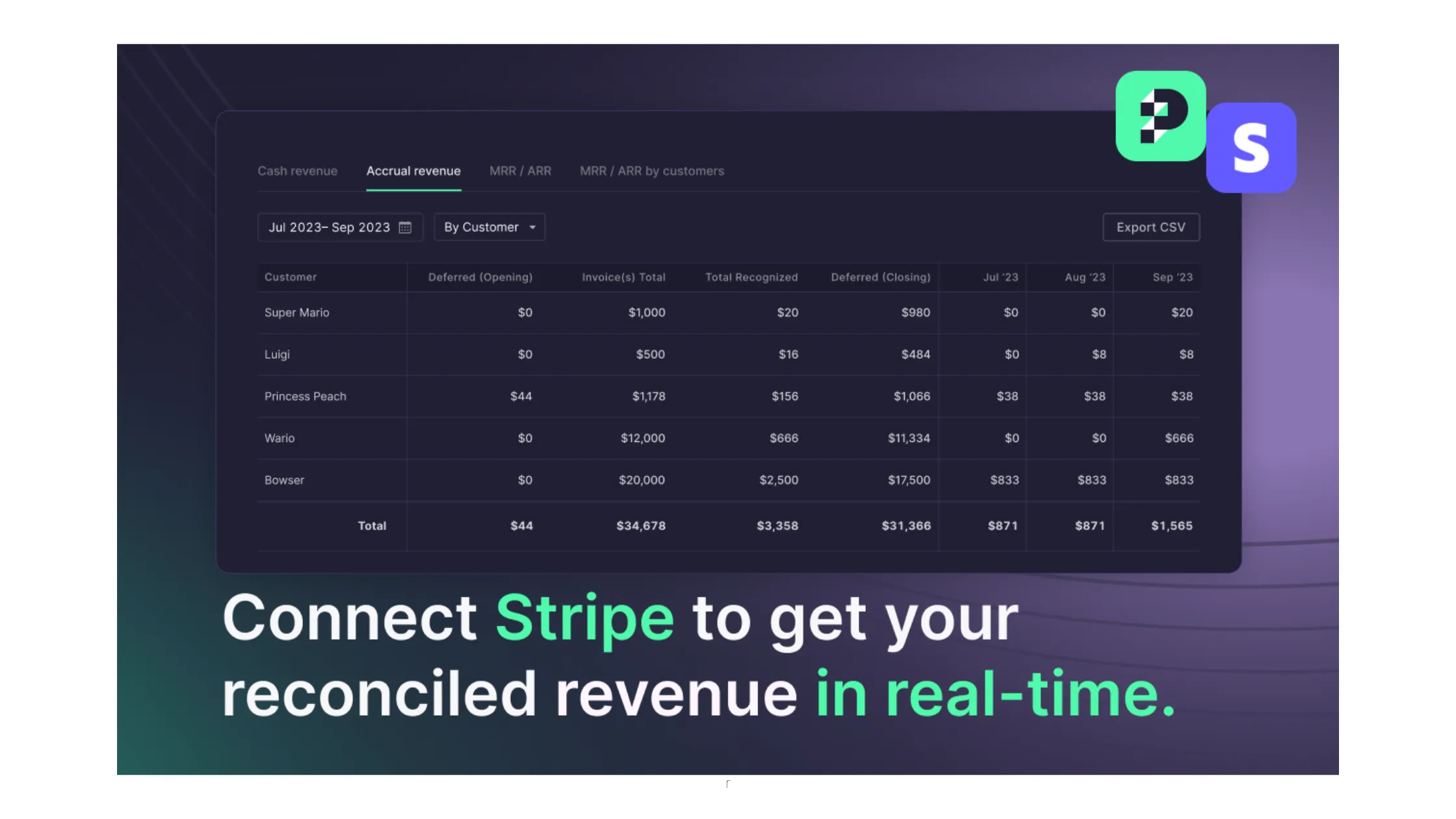
Puzzle, AI-native accounting software built for startups, offers a suite of Automated Revenue Recognition features for companies using Stripe for subscription billing.
This breakthrough makes tricky calculations like accrued revenue, deferred revenue, MRR (Monthly Recurring Revenue), ARR (Annual Recurring Revenue), etc., super easy to access with just a single click, saving you from the hours previously spent updating spreadsheets.
TLDR:
Any company using Stripe subscription billing can use Puzzle to ensure revenue is recorded properly within their accounting system. While founders and accountants traditionally relied on complex spreadsheets for revenue calculations, Stripe users can now see their subscription revenue, automated deferred revenue, and other real-time revenue insights (like MRR/ARR) directly in Puzzle. This has multiple benefits:
Stripe users traditionally use a manual process to correctly record their revenue between Stripe and legacy accounting systems, like QuickBooks. These include:
| Method | How it works | Key drawbacks |
|---|---|---|
| Third-party connectors | A middleware tool (e.g., a Zapier workflow or dedicated sync app) pushes Stripe data into QuickBooks or Xero | Prone to breaking, disconnecting, and sync failures; requires ongoing maintenance |
| Manual journal entries | Accountant manually creates entries in the general ledger for each Stripe transaction or period | Time-intensive and error-prone; doesn't scale with transaction volume |
| Spreadsheet calculations | Accrued revenue, deferred revenue, MRR, and ARR calculated by hand in complex spreadsheets | Labor-intensive; disconnected from billing source; must be updated manually each period |
| Puzzle's native integration | Stripe data flows directly into Puzzle's general ledger; service period dates drive automatic rev rec schedules | No connector required; 100% auto-categorization; real-time MRR, ARR, accrued and deferred revenue |
Now, with Puzzle's Stripe integration, there is a more efficient, accurate, and automated way to record revenue in your accounting system. Puzzle saves time and eliminates errors by automating the recording of revenue (accrued, deferred, MRR, ARR, and more). These automated system calculations translate into significant time savings that allow everybody to redirect efforts from manual tasks to more strategic, valuable work.
Puzzle’s native integration also simplifies data management for Stripe users. Instead of purchasing and learning two additional systems on top of Stripe (an accounting software and a third-party connector), Stripe users can access everything they need directly in Puzzle’s accounting system.
Puzzle’s automation around the revenue recognition process reduces the risks of outdated data and errors from manual calculations.
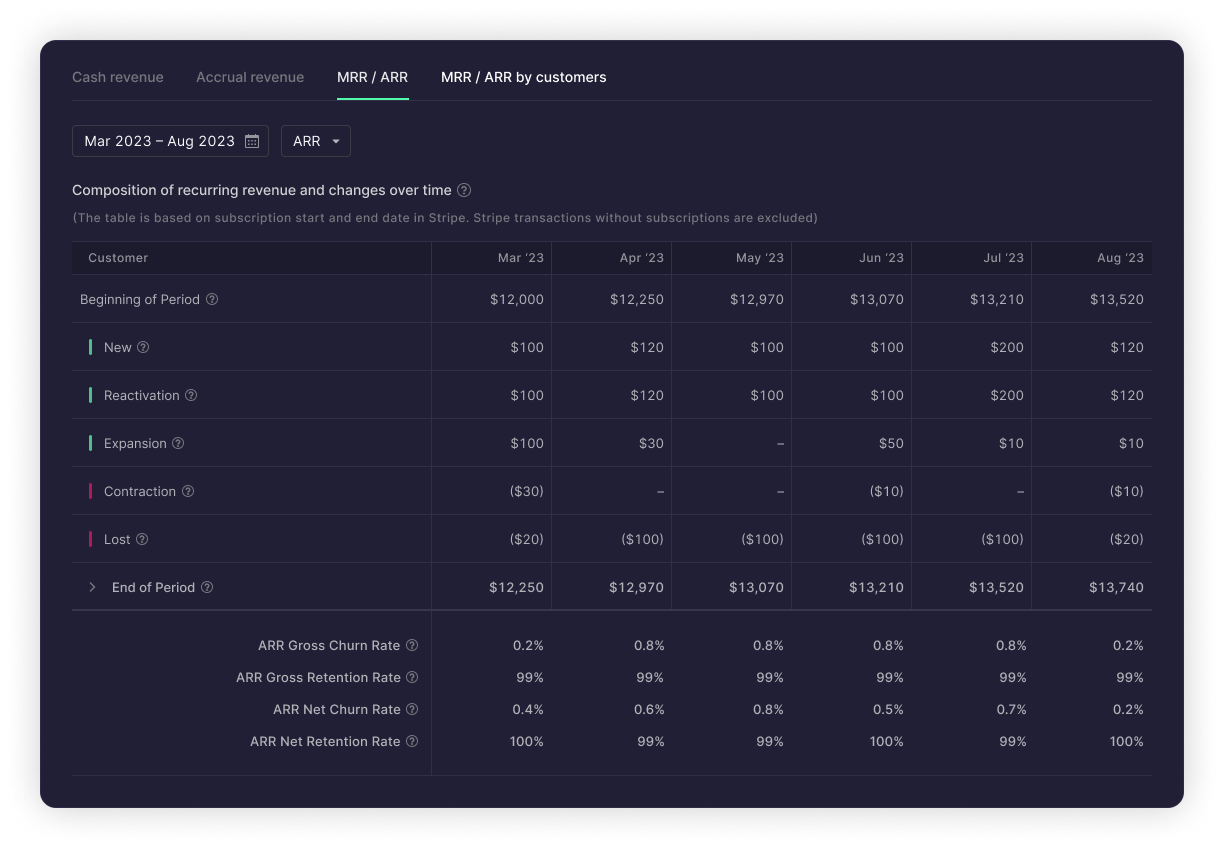
With Automated Revenue Recognition, Stripe users can get the following schedules directly in Puzzle within seconds, not days:
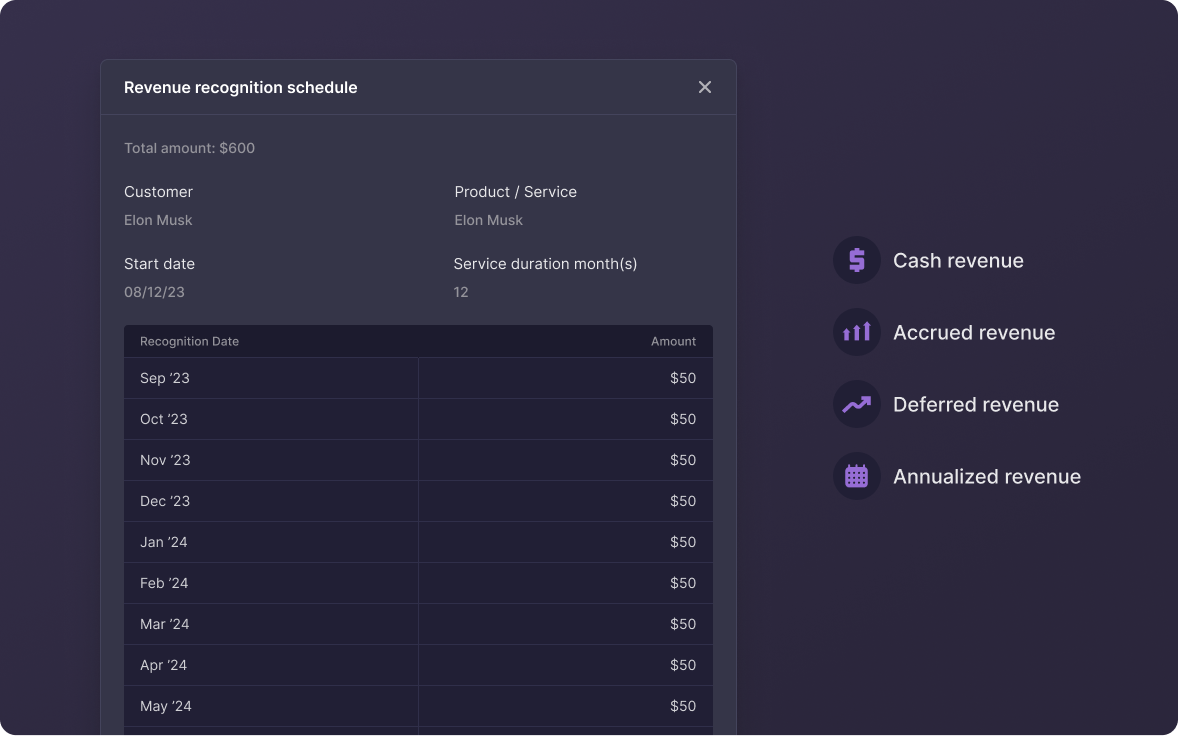
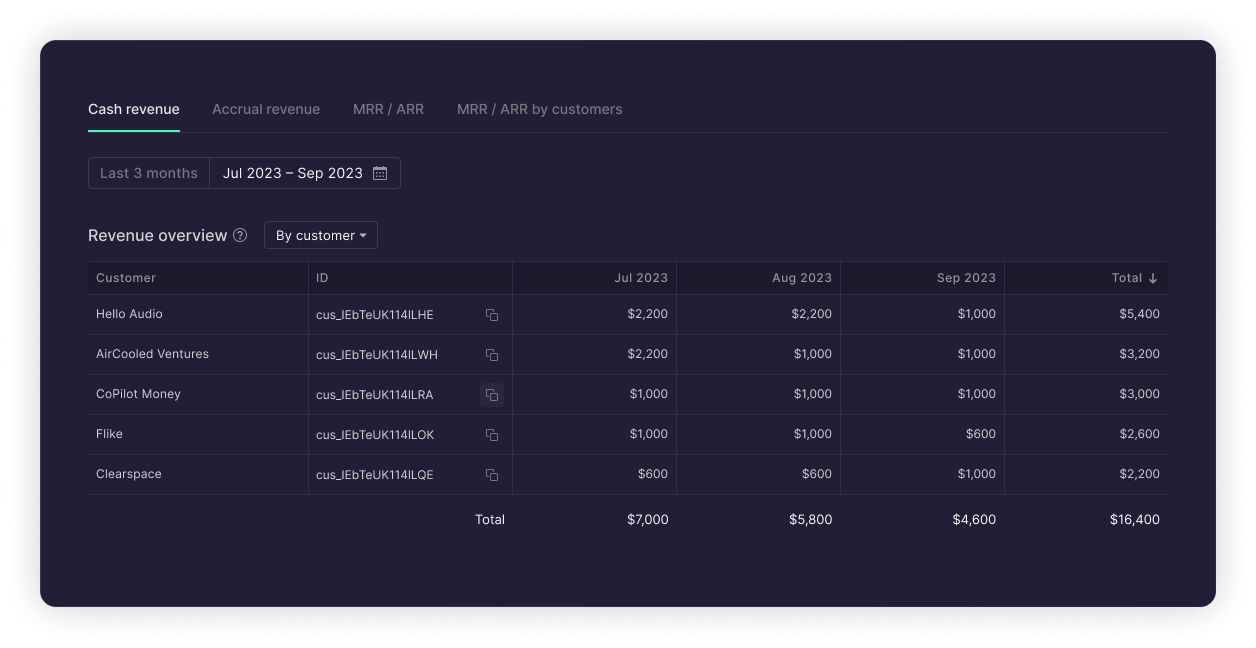
Revenue recognition is a timing exercise tied to subscription products and contract durations. Startups need it for compliance with investor, lender, and regulatory requirements. Puzzle’s Automated Revenue Recognition addresses the need for companies to maintain accrual-basis revenue when they need compliant financial records that align with international Generally Accepted Accounting Principles (GAAP).
With accurate and reliable accrued revenue information now available directly in their accounting system, companies can confidently provide accurate data to the IRS, investors, stakeholders, and financial institutions, ensuring compliance and trustworthiness.
Startup founders need revenue analytics to understand growth, retention, and business trends to help with fundraising. MRR, ARR, Churn Rate, and Retention Rates from Stripe subscriptions are all instantly accessible in Puzzle now. This eliminates the need for manual spreadsheet calculations and system cross-referencing.
Puzzle and Stripe, in combination, make the complex process of calculating accrued revenue, deferred revenue, MRR, ARR, and more - seamless, efficient, and accurate.
This month, Stripe completed a significant shift: as of August 20, 2026, Stripe automatically disabled its native Revenue Recognition product for any account that hadn't switched to a paid subscription plan. Stripe's built-in revenue recognition now starts at $25/month and scales up to $1,650/month or more depending on payment volume — a new recurring cost on top of standard Stripe processing fees.
For startups already using Stripe Billing, this is a natural moment to reassess how you're handling revenue recognition. Puzzle's native Stripe integration gives you GAAP-compliant accrual accounting, automated deferred revenue schedules, and real-time MRR/ARR reporting — all inside your accounting system, not as a Stripe add-on. Rather than paying separately for revenue recognition on top of your payment processor, you get it as part of the accounting layer where those numbers actually belong.
To learn more about how this integration works, review our Automated Revenue Recognition user guide.
For SaaS companies running subscription billing through Stripe, Puzzle is the only accounting system built natively on top of Stripe — not connected to it through a third-party sync. That distinction matters: tools like QuickBooks, Xero, and NetSuite can receive Stripe data, but they require an additional connector (like Ramp or a Zapier workflow) that needs ongoing maintenance and is prone to sync failures. Pilot and other managed accounting services layer on top of those same legacy systems. Puzzle ingests your Stripe data directly into its general ledger, auto-categorizes 100% of your Stripe transactions, and generates GAAP-compliant revenue recognition schedules — accrued revenue, deferred revenue, MRR, and ARR — in real time, without a connector in between.
Most accounting software — QuickBooks, Xero, NetSuite — doesn't track SaaS metrics like ARR, MRR, or Net Revenue Retention (NRR) at all. You're expected to pull that data from Stripe or a separate analytics tool and reconcile it manually. Puzzle changes that by pulling your Stripe subscription data directly into its accounting layer. Because Stripe transactions are 100% auto-categorized in Puzzle, it can compute MRR, ARR, churn rate, and net retention automatically from your actual billing data — not from a spreadsheet formula you update each month. These metrics update in real time and live inside the same system as your P&L and balance sheet, so you're not cross-referencing two tools to get a complete picture.
Deferred revenue arises whenever a customer pays upfront for a subscription period that hasn't been fully delivered yet — a common situation for any SaaS business with monthly or annual plans. GAAP requires you to recognize that revenue ratably over the service period, not when the cash lands. Doing this manually means creating journal entries for every subscription, every period — a process that scales poorly and introduces errors. The right approach is to use an accounting system that reads the service period dates directly from your billing platform. Puzzle does exactly this: it pulls contract start and end dates from Stripe, then automatically generates deferred revenue schedules and posts the correct journal entries on your behalf. No spreadsheets, no manual entries, no risk of mis-timing revenue.
Automating revenue recognition under ASC 606 requires three things: a reliable source of contract and billing data, a system that can identify performance obligations and service periods, and a general ledger that posts the resulting entries automatically. Spreadsheets fail on all three: they're disconnected from your billing source, require manual updates when contracts change, and can't post journal entries. Tools like Chargebee and Maxio add revenue recognition reporting on top of Stripe, but they sit outside your accounting system — meaning you still need to export data and reconcile. Puzzle is built differently: it connects directly to Stripe, reads subscription service periods, computes ASC 606-compliant revenue schedules (accrued, deferred, MRR/ARR), and posts the entries inside your accounting system automatically. Your books stay current without any spreadsheet work.
In Puzzle, you configure revenue recognition policies at the invoice type or product level — not transaction by transaction. Once a policy is set, Puzzle automatically applies it to every matching recurring invoice from Stripe: identifying the service period, splitting revenue across the correct months, and posting it to the designated GL accounts without a manual journal entry. The setup flow walks you through selecting the recognition method (ratably over the service period, at a point in time, etc.), confirming the target revenue account, and choosing whether policies apply automatically or require a per-invoice confirmation step. After the initial configuration, new Stripe invoices of that type are routed and recognized without any monthly intervention. For step-by-step instructions, see the Automated Revenue Recognition user guide.
Automated Revenue Recognition — including deferred revenue schedules, accrual-basis recognition, and MRR/ARR reporting — is available on Puzzle's paid accounting plans, not the free tier. If you're evaluating Puzzle specifically for subscription revenue compliance, check the current plan comparison on the Puzzle pricing page or reach out to the team directly. The short answer: any plan designed for SaaS businesses includes the full rev rec feature set. If you're on a legacy or grandfathered plan and unsure whether you have access, the Revenue section of your Puzzle account will show whether Automated Revenue Recognition is active.
This is a real risk with any accounting system that ingests both bank transactions and invoicing data — and it's one of the reasons a native Stripe integration matters. When Stripe settles a payment, it creates two related events: an invoice (the revenue transaction) and a payout (the cash deposit to your bank account). Counting both as revenue would double the figure. Puzzle handles this by treating the Stripe payout as a balance sheet movement (cash in, accounts receivable out) and recognizing revenue from the invoice, not the payout. Because Puzzle reads directly from Stripe's data model rather than from your bank feed alone, it understands which transactions represent earned revenue and which represent cash settlement — and posts them accordingly. If your setup includes both a connected bank account and Stripe, Puzzle's categorization logic prevents the overlap automatically.
Puzzle's automation works best when Stripe subscriptions are set up with explicit service period dates — the standard configuration for most SaaS billing. For non-standard setups (legacy plans without clear period metadata, one-off invoices mixed with subscriptions, metered billing, or mid-period upgrades and downgrades), Puzzle's recognition logic applies the best available signal from the Stripe data it receives. In edge cases where Stripe doesn't provide a service period, Puzzle defaults to recognizing revenue at the invoice date and flags the transaction for your review rather than silently mis-classifying it. You can then apply or override a recognition policy manually. If your Stripe configuration is complex or was set up before best practices solidified, it's worth auditing your subscription product setup in Stripe before connecting — clean period metadata upstream produces clean rev rec schedules downstream.