Originally posted on Ramp
TLDR:
In the dynamic and fast-paced world of venture-backed startups, accounting and financial professionals like Megan Reid, Accounting Manager of the SaaS Division at Burkland, are constantly looking for ways to save time and for scalable processes in their work.
Burkland is one of the leading accounting and advisory firms for startups in the U.S. With over 50 venture capital partners and 800+ startup clients, Burkland is experiencing rapid growth across all divisions–especially their SaaS division.
With this rapid growth and a fully remote team, increasing the efficiency and scalability of routine accounting and bookkeeping tasks represented a major opportunity for the firm.
This involved reassessing and optimizing existing processes, particularly the traditionally time-consuming bookkeeping and accounting tasks during the month-end close for certain clients.
Burkland’s clientele included fast-growing venture-capital-funded startups with growing expenses who increasingly chose to use modern fintech tools like Mercury, Puzzle, Stripe, Gusto, Rippling, and Ramp.
Managing numerous employee reimbursements and growing operating expenses put pressure on Megan and her team, demanding a solution that could make their accounting operations more efficient.
As both a division manager and bookkeeper managing clients, Megan wanted to find a way to empower her teams to thrive and find more efficiencies.
When Burkland sought to focus on the most optimal expense management and reimbursement system to optimize its accounting operations, Rampemerged as the clear choice.
Ramp offered Burkland the opportunity to streamline their client’s accounting workflows and accounting efficiencies, particularly when used in combination with accounting software partner Puzzle.
Megan decided to test the combination of Ramp’s Accounting API and Puzzle’s Bill Pay API on one of her startup clients with a growing number of expenses, particularly employee reimbursements.
During the month-end process, Megan had two processes that were particularly time-consuming for this client.
1. Spend and reimbursement categorization
Categorizing all of her client’s financial transactions, including non-payroll spend and employee reimbursements, typically took Megan over 1 hour. Megan historically categorized expenses and reimbursements in a standalone expense management system before often duplicating her efforts and re-categorizing expenses in the core accounting system too. This created inefficiencies.
2. Uncategorized transaction investigation
For transactions that required more context and supporting documentation, Megan typically made a list of outstanding questions for her client. Communicating back and forth with clients on uncategorized transactions would take several days.
To address these challenges, Burkland leveraged Ramp's new API with Puzzle, the first integration of its kind between Ramp and any accounting software.
First, this integration allowed the chart of accounts in the client’s core accounting system, Puzzle, to seamlessly sync with Ramp. Consequently, when expenses were coded in Ramp on corporate cards, Ramp’s API automatically synced all spend data directly into Puzzle’s general ledger, including memos and copies of receipts or invoices.
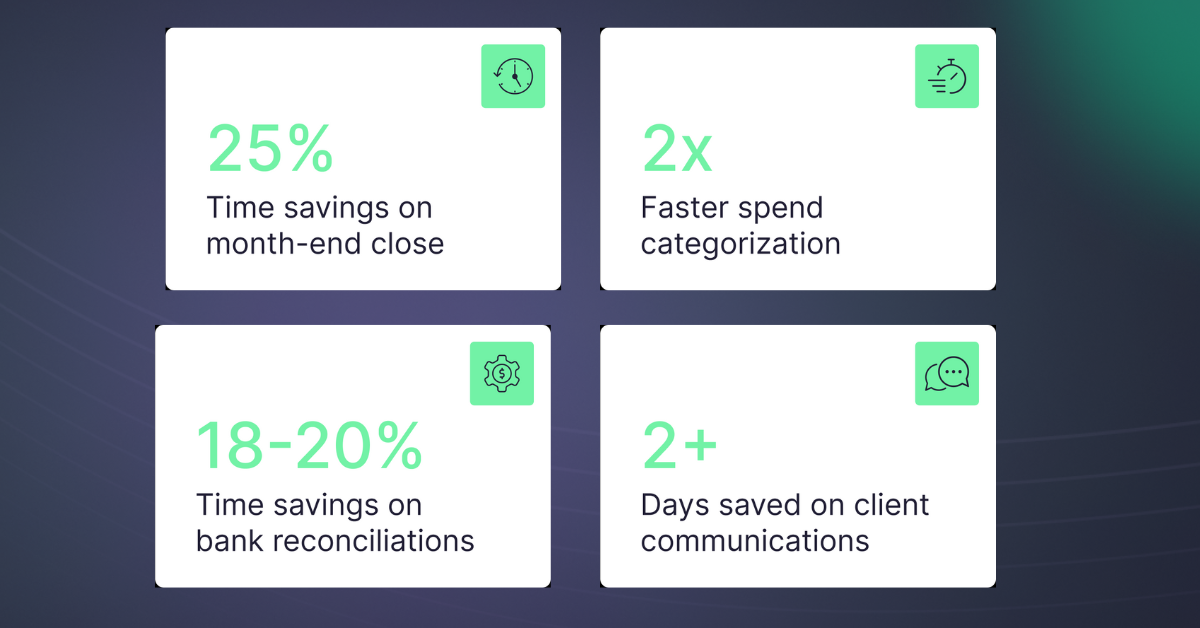
Tackling the challenge of categorizing the high volume of expense reimbursements with her client, Megan found another win with Ramp. Ramp’s integration with Puzzle enabled detailed metadata and copies of receipts from single-line employee reimbursement items to flow seamlessly into Puzzle. Now, Megan could access comprehensive context for each stand-alone expense reimbursement just by looking at the transaction. Ramp’s memo field and PDF copies of receipts synced over, which also allowed Puzzle to auto-categorize the transaction. This was a complete game-changer. Ramp’s API eliminated the need for time-consuming investigations and communication with Megan’s client, as she had all the details directly in the accounting system. This automation saved Megan a substantial amount of time and reduced her categorization process by 50%.
Finally, taking efficiency to the next level, Megan also eliminated 100% of her back-and-forth investigation into uncategorized expenses with the client. All the data, context, supporting documentation, and receipts she needed were synced over by Ramp’s API into Puzzle. “The bank, credit card, and Ramp integrations in Puzzle saved time and days by removing the need to ask the client to review categorizations, and then making those corrections in the accounting software. It can take several days to get the requested information from clients, otherwise,” said Megan.
By harnessing the combined power of Ramp's Accounting API and Bill Pay API with Puzzle, Megan's workload around month-end close was reduced by 25%.
The implementation of Ramp's Accounting API and Bill Pay API produced incredible outcomes: significant time savings, enhanced efficiencies, and faster month-end close for Megan’s client.
| Task | Before Ramp + Puzzle | After Ramp + Puzzle | Improvement |
|---|---|---|---|
| Transaction categorization | Standard pace | 2× faster | 50% time reduction |
| Uncategorized transaction investigation (client back-and-forth) | 2+ days | Eliminated | 100% eliminated |
| Overall month-end close | Baseline | Faster coding, accruals & reconciliations | 25% reduction |
“Puzzle is an accounting software that is great, particularly for startups. Puzzle really leverages AI, automations, and Ramp integrations to help us as accountants code transactions faster, reconcile accounts more easily, and then in the long run, provide accurate and detailed reports as well as dashboards to our clients,” said Megan.
The benefits extended to Megan’s client, too, who reaped the rewards of a faster month-end close. The timely reporting facilitated more agile decision-making, helping the client gain deeper insights into their operations, spend, and burn trends.
In the words of Megan, "the Ramp integration is my favorite and the largest time saver. The Ramp integration worked extremely well in Puzzle. This made the reimbursement, credit card, and accounts payable month-end processes much quicker and easier .”
As Megan and Burkland continue to embrace the power of Ramp and Puzzle’s solutions, they hope to achieve even greater efficiencies.
Megan's experience at Burkland distills into a short checklist that any lean startup finance team can apply:
The tools at the center of this story continue to evolve. In June 2026, Ramp launched Payment Runs for Bill Pay — letting AP teams group approved vendor payments into named batches, review them together, and release funds in a single action instead of one bill at a time. For firms like Burkland managing multiple clients' payables, that's another layer of manual work removed from the month-end process. Then in July 2026, Ramp added VAT-compliant reimbursement statements — automatically embedding entity VAT numbers and registration details on reimbursement exports. For any Burkland client with EU, UK, or Canadian operations, that eliminates a manual compliance step that previously had to happen outside the system.
Then, on September 2, 2026, Accrual announced an agreement to acquire Puzzle's accounting-firm technology and business — including its AI-native ledger, AI Close, Cowork, and Chat products. Puzzle will continue to operate as an independent platform for startups and small businesses, while Accrual integrates Puzzle's firm-facing tools into its own platform to accelerate client accounting services. For firms already using the Ramp + Puzzle stack, the core workflows Megan describes above remain intact — and the roadmap points toward even deeper automation ahead.
Traditional bookkeeping tools update your books when your accountant codes transactions — which usually means you see accurate numbers days or weeks after the month ends. Real-time visibility requires two things working together: a bank and card integration that pulls transactions continuously (not on a nightly batch), and an accounting layer that auto-categorizes those transactions as they arrive. Puzzle connects directly to your bank feeds, Ramp, Stripe, Mercury, and other fintech tools, then uses AI to categorize transactions and update your burn rate and runway dashboard daily — without waiting for a manual close. Founders can log in any morning and see current cash, this month's burn, and how many months of startup runway remain, all based on actual coded transactions rather than estimates.
Dual-basis accounting means maintaining both a cash-basis view and an accrual-basis view of your books simultaneously. Cash basis records revenue when cash is received and expenses when cash is paid — useful for daily cash-flow and burn-rate visibility. Accrual basis records revenue when earned and expenses when incurred — required for GAAP compliance, investor reporting, and fundraising due diligence. Legacy tools like QuickBooks or Xero let you toggle between views in reports, but the underlying ledger is single-basis; switching requires manual adjustments and reconciliation work. Puzzle was built with a dual-basis general ledger from the start, so both sets of books are maintained in parallel automatically. You can watch daily cash flow on a cash basis while your accountant produces GAAP-compliant accrual financials for your board deck — no manual conversion required. This is particularly valuable for venture-backed startups that need accurate burn-rate dashboards for founders and auditable accrual financials for investors, without doubling the accounting workload.
Puzzle is fully self-serve. You can connect your bank feeds, import your chart of accounts, and start coding transactions without scheduling a call. Most teams are up and running within a day. If you prefer a guided walkthrough, onboarding support is available — but it's opt-in, not a gate. Accounting firm partners like Burkland also get access to a dedicated partner channel for faster setup across multiple client entities.
Direct business customers get self-serve onboarding plus in-app support. Accounting firm partners get a dedicated partner program: a private channel for firm-level questions, priority support escalation, and access to Puzzle's Cowork and Chat tools built specifically for firm workflows. The distinction matters when you're onboarding dozens of clients — firms aren't treated as a queue of individual users but as strategic partners with their own support lane.
When you connect a bank that holds both personal and business accounts under one login, Puzzle surfaces all accounts in that institution and lets you select only the ones that belong to the business. Any account you don't select won't import. If a personal transaction slips through, you can exclude it directly in Puzzle — marking it as a personal transaction removes it from the books without touching the raw feed. The correction takes seconds and doesn't require re-importing the affected period.
AI Close is Puzzle's agent-driven month-end workflow. It runs a checklist of close tasks — transaction review, accrual entries, reconciliation steps — in sequence, and surfaces items that need your sign-off before anything posts to the general ledger. Pre-built templates cover the most common close patterns (standard operating-expense close, accrual close, multi-entity roll-up), and firms can save custom templates for recurring client configurations. Each AI action (categorization suggestion, journal entry draft, anomaly flag) draws from a monthly AI credit pool tied to your plan. Credits reset each month; unused credits don't roll over. For high-volume clients, firms can purchase additional credits or manage allocation across entities from the firm dashboard.
When a live bank feed isn't available — older institutions, international accounts, or banks that restrict API access — Puzzle accepts PDF bank statement uploads directly. It parses the statement, extracts individual transactions, and runs them through the same AI categorization engine used for live-feed data. Puzzle maps each transaction to your chart of accounts, flags anything ambiguous, and queues it for review. The result is the same categorized transaction set you'd get from a live sync, without requiring a real-time connection. This is particularly useful during a QuickBooks migration, when historical statements need to be loaded before a live feed is established.
Migration starts with locking in your beginning balances — the ending balances from your last QuickBooks period become the opening entries in Puzzle's general ledger. From there, you have two options for historical transactions: import them via CSV export from QuickBooks (Puzzle maps the fields automatically), or upload PDF bank statements for any period where QuickBooks data is incomplete. Puzzle's AI categorizes the imported history using your chart of accounts, so you're not re-coding years of transactions by hand. Most migrations are completed without needing to touch the historical data again after the initial import and balance verification.
For payroll providers that don't have a direct Puzzle integration, you can upload the payroll summary report or PDF directly into Puzzle. The AI Close agent parses the report — gross wages, employer taxes, benefits deductions, net pay — and drafts the corresponding journal entry mapped to your chart of accounts. You review and approve before it posts. This eliminates the manual re-entry that typically consumes 30–60 minutes per payroll run at close. As Puzzle's agent library expands (including tools now being integrated from the Accrual acquisition), more payroll providers are expected to receive native connections — but the PDF-to-journal-entry path covers the gap in the meantime.
Two scenarios come up here. First, transactions that are authorized but not yet settled (e.g., a card charge that hit your Ramp account this morning but hasn't posted to the bank): Puzzle pulls from both the live card feed and the bank feed, so authorized transactions appear in your dashboard before they clear — flagged as pending so you're never double-counting. Second, accounts that can't connect via a live feed (older banks, international accounts, restricted APIs): Puzzle accepts PDF bank statement uploads and parses them through the same AI categorization engine, so the gap period is still coded and visible. If neither a feed nor a PDF covers a specific window — say, a wire that's in-flight — you can enter a manual journal entry to hold the placeholder. Your burn-rate and runway numbers will reflect it immediately, and the entry gets reconciled when the transaction settles. The practical result: your cash position is never frozen waiting for a feed to catch up.
Waiting for month-end close to check your burn rate means you're always looking at data that's 2–4 weeks stale. Real-time tracking requires two things: a continuous bank feed that pulls transactions as they clear (not a nightly batch), and an accounting layer that auto-categorizes those transactions the moment they arrive. When both are in place, your burn rate and runway update daily — not once a month. Puzzle connects directly to your bank accounts, Ramp, Stripe, Mercury, and other fintech tools, then uses AI to categorize each transaction automatically. Your burn and runway dashboard reflects actual coded transactions, not estimates. The month-end close becomes a brief final review rather than a data-entry sprint — which is how Burkland cut its clients' close time by 25%.
At the seed stage, you typically have one bank account, a small expense stack, and no controller — but the stakes of running out of cash are just as high as at Series B. You need a setup that just works without requiring a dedicated finance hire. The practical approach: connect your primary bank feed and your corporate card (Ramp, Brex, or similar) to an accounting tool that auto-categorizes transactions and updates your dashboard daily. Puzzle does this without requiring a monthly close cycle — you can log in any morning and see current cash, this month's burn, and months of runway remaining based on actual transactions, not a spreadsheet model. The formula is straightforward: runway = current cash ÷ monthly net burn. The hard part has always been keeping the denominator current. A live-feed accounting setup solves that automatically, so you're never caught off guard by a number that's three weeks old when you sit down with an investor.
Check out Puzzle to experience a faster month-end close.