Managing revenue recognition from Stripe subscriptions typically requires hours of manual spreadsheet work each month. Puzzle's native Stripe integration automates revenue recognition, deferred revenue schedules, and key SaaS metrics like MRR and ARR directly inside your accounting system. Instead of stitching together third-party connectors and manual journal entries, Stripe users get accurate, real-time revenue data in Puzzle with a single connection. This guide shows you exactly how the integration works, what it automates, and how it compares to alternatives like QuickBooks and Xero.
TLDR:
This is a major step forward for Stripe and Puzzle users! Here's why:
For the first time, any company that uses Stripe subscription billings can use Puzzle to make sure revenue is recorded properly for accounting purposes within their accounting system. Traditionally, founders and accountants relied on complex spreadsheets for revenue calculations. Stripe users can now see their subscription revenue, automated deferred revenue, and other real-time revenue insights (like MRR/ARR) directly in Puzzle. This has multiple benefits:
Stripe users traditionally use a manual process to get their revenue recorded correctly between Stripe and legacy accounting systems, like QuickBooks. These include:
Now, with Puzzle's Stripe integration, there is a faster, reliable, and automated way to record revenue in your accounting system. Puzzle saves time and cuts errors by automating the recording of revenue (accrued, deferred, MRR, ARR, and more). These automated system calculations translate into real time savings that allow everybody to redirect efforts from manual tasks to more strategic, valuable work.
A seed-stage SaaS team that previously spent eight or more hours a month reconciling Stripe revenue in spreadsheets can cut that to under 30 minutes with Puzzle. A startup closing its first fundraising round no longer needs to manually compile MRR tables for investor data rooms: Puzzle surfaces that data automatically from Stripe transactions. For a company managing annual and monthly subscription tiers, Puzzle generates separate deferred revenue schedules per product without any manual journal entries.
Puzzle’s native integration also simplifies data management for Stripe users. Instead of purchasing and learning two additional systems on top of Stripe (an accounting software and a third-party connector), Stripe users can access everything they need directly in Puzzle’s accounting system.
Puzzle’s automation around the revenue recognition process reduces the risks of outdated data and errors from manual calculations.
With Automated Revenue Recognition, Stripe users can get the following schedules directly in Puzzle within seconds, not days:
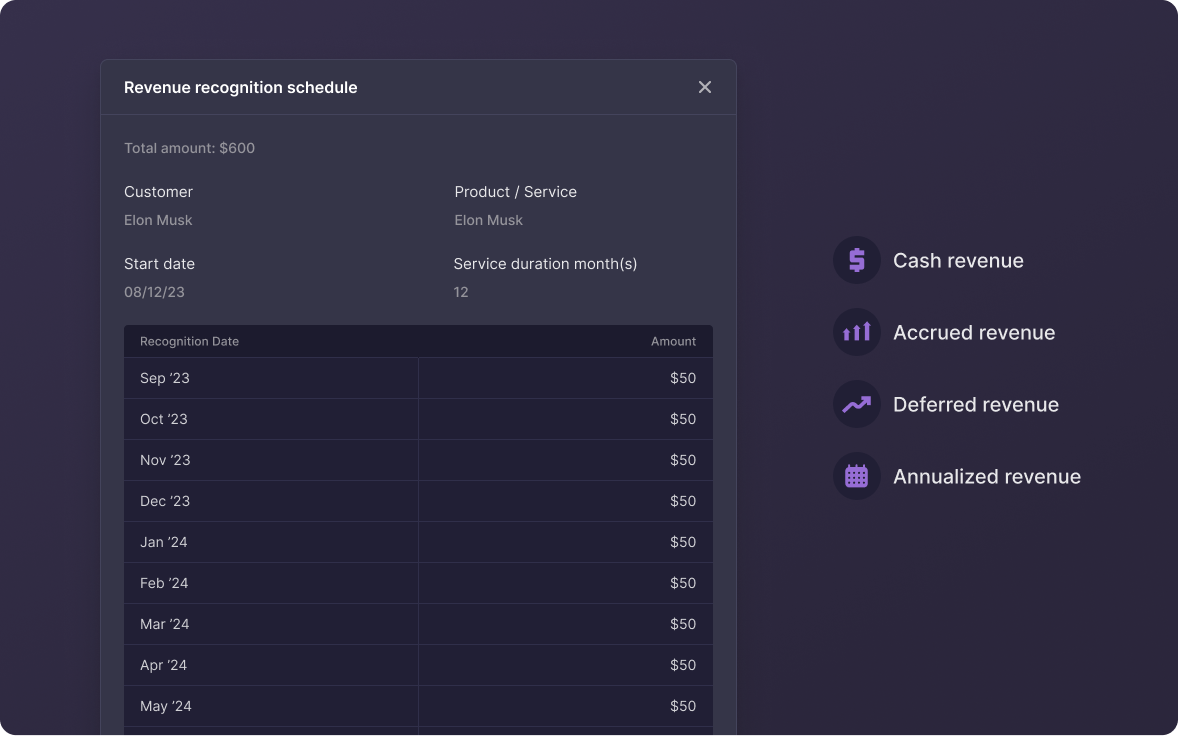
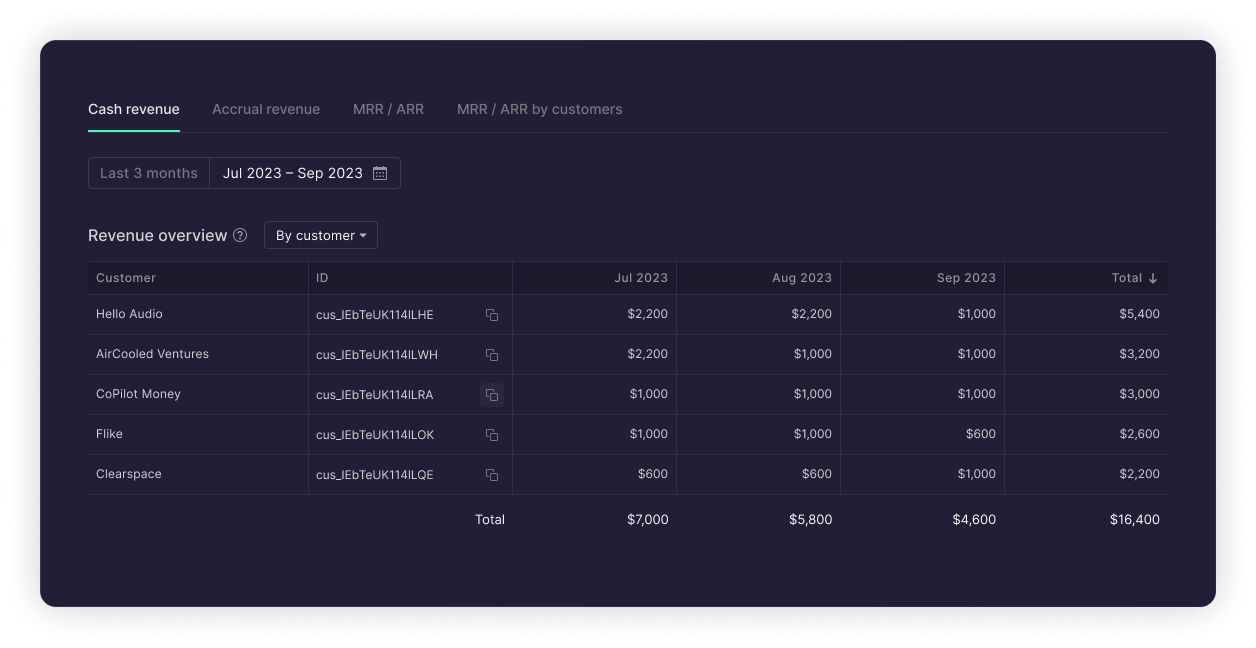
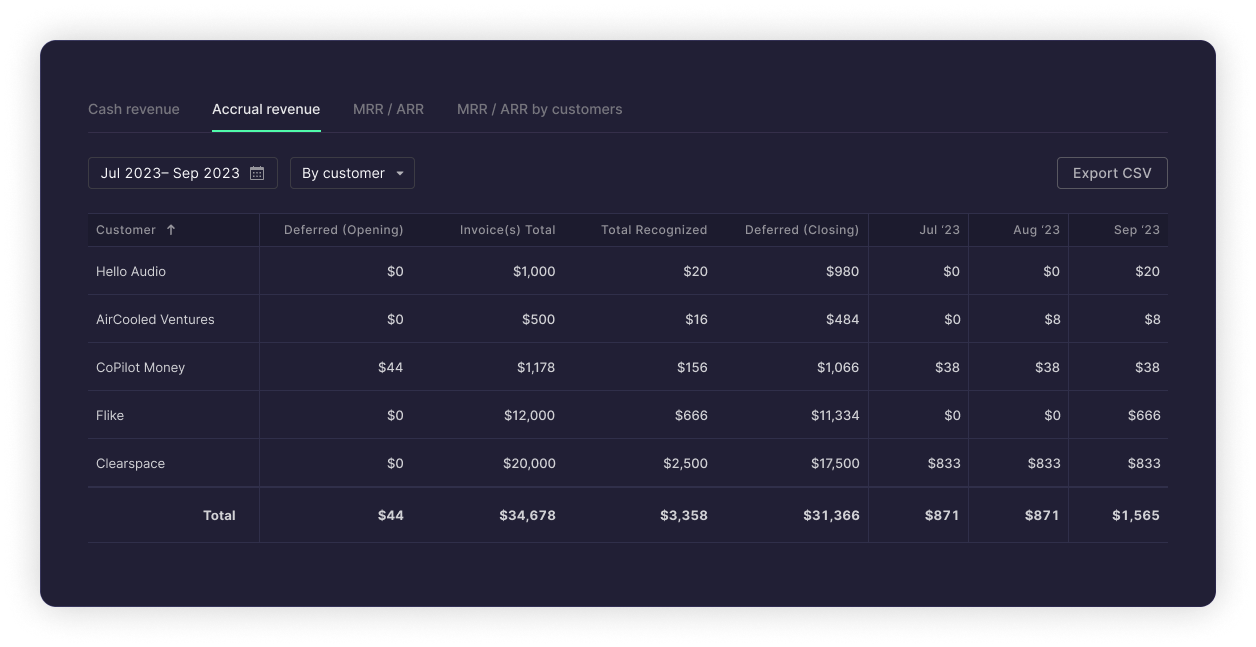
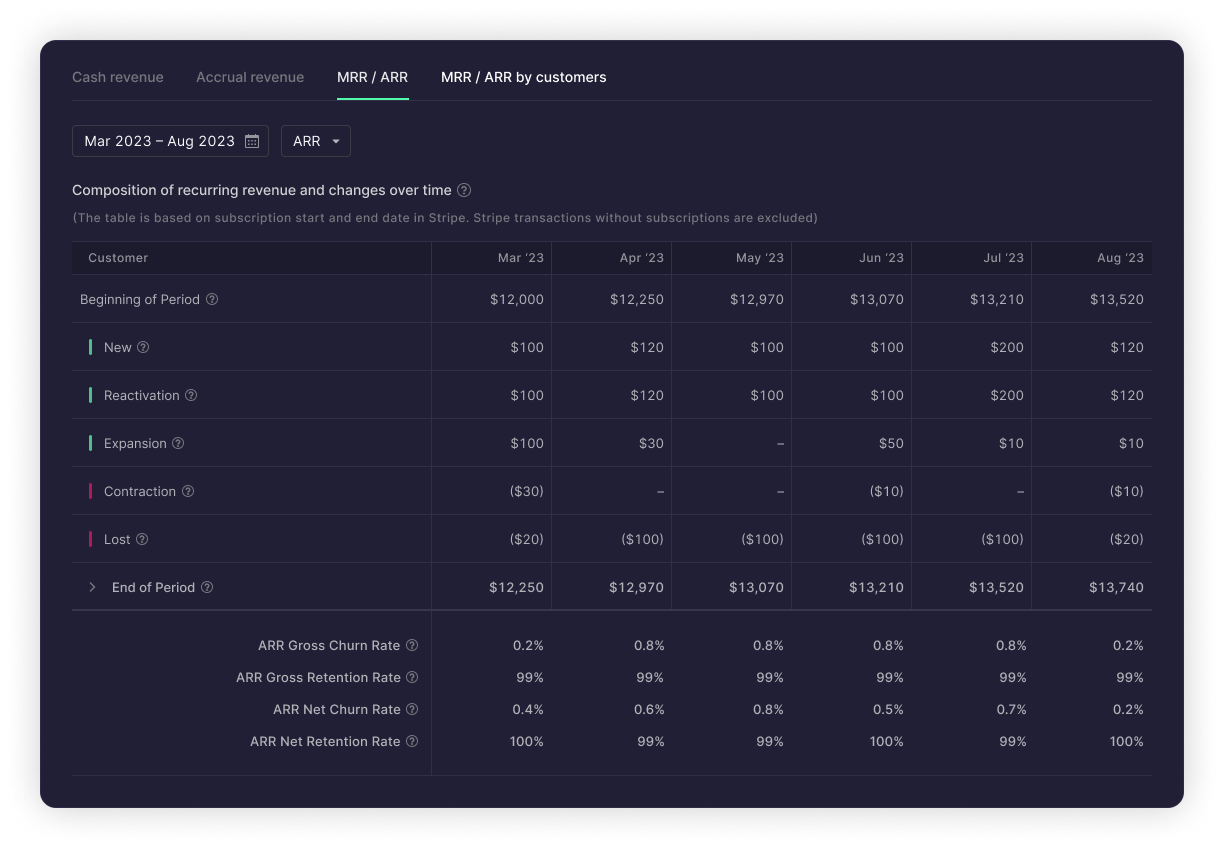
Revenue recognition is a timing exercise tied to subscription products and contract durations, so choosing the right revenue recognition software matters. Startups need it for compliance with investor, lender, and regulatory requirements. Puzzle's Automated Revenue Recognition meets the need for companies to maintain accrual-basis revenue when they need compliant financial records that align with GAAP revenue recognition standards for SaaS (ASC 606).
With accurate and reliable accrued revenue information now available directly in their accounting system, companies can confidently provide accurate data to the IRS, investors, stakeholders, and financial institutions, supporting compliance and building trust.
Pros: Revenue recognition is automated from day one, so accrued and deferred schedules are always current. MRR and ARR update in real time inside your accounting system. All calculations follow GAAP accrual-basis rules, giving investors and lenders audit-ready numbers. Because Puzzle connects directly to Stripe, there are no third-party connectors to maintain or break.
Cons: The integration is Stripe-centric, so it works best for companies whose primary billing runs through Stripe subscriptions. You will also need a Puzzle account set up and your Stripe account connected before any automation kicks in.
Startup founders need revenue analytics to understand growth, retention, and business trends to help with fundraising. MRR, ARR, Churn Rate, and Retention Rates from Stripe subscriptions are all instantly accessible in Puzzle now. This cuts out manual spreadsheet calculations and system cross-checking. For example, a SaaS startup with $50K MRR can instantly see net churn at 2% and a 12-month ARR run rate of $600K, figures that used to take hours to compile. An early-stage SaaS startup at $12K MRR can see its month-over-month growth rate of 18% and a net retention rate of 108% directly in Puzzle, with no spreadsheet work required. And for a startup running a mix of monthly and annual plans, Puzzle separately tracks deferred revenue for annual subscribers and recognized revenue for monthly subscribers in real time, so founders always know exactly where they stand without waiting for a manual reconciliation. A B2B SaaS company at $200K ARR can use Puzzle to confirm net revenue retention above 100% for three consecutive months and share a live, up-to-date revenue view with investors directly, skipping the back-and-forth of emailing updated spreadsheets entirely.
Puzzle and Stripe in combination make the complex process of calculating accrued revenue, deferred revenue, MRR, ARR, and more - accurate, automated, and reliable.
Setup takes a few minutes. Follow our Stripe integration setup guide for details. Here is how to get started:
| Feature | Puzzle | QuickBooks | Xero |
|---|---|---|---|
| Native Stripe integration | Yes, built in | No | No |
| Automated revenue recognition | Yes, automatic | Manual or via add-on | Manual or via add-on |
| Deferred revenue schedules | Auto-generated | Manual journal entries | Manual journal entries |
| Real-time MRR/ARR | Yes, inside accounting system | Requires separate tool | Requires separate tool |
| GAAP accrual-basis | Yes, automatic | Yes, manual setup | Yes, manual setup |
| Third-party connector required | None needed | Yes (e.g. SaasOptics) | Yes (e.g. SaasOptics) |
| Setup time | Single connection | Multi-step integration | Multi-step integration |
To learn more about how this integration works, review our Automated Revenue Recognition user guide.
Puzzle pulls your Stripe transaction history through a single connection and generates accrual and deferred revenue schedules directly from your Stripe service period dates, with no manual journal entries required. The system auto-categorizes 100% of Stripe subscription revenue and produces GAAP-compliant recognition schedules within seconds. MRR, ARR, net churn, and retention rates then appear live inside your accounting system.
Yes. Once Stripe is connected to Puzzle, MRR, ARR, net churn, and net retention update in real time inside your accounting system, with no third-party tool required. A SaaS startup at $50K MRR can instantly see a 2% net churn rate and a $600K ARR run rate without running a single spreadsheet calculation.
QuickBooks and Xero both require third-party connectors (such as SaasOptics) and manual journal entries to get deferred revenue schedules and real-time SaaS metrics. Puzzle has a native Stripe integration built in, so accrual schedules, deferred revenue, and MRR/ARR generate automatically from day one with no connector to maintain or break.
Puzzle generates automated revenue recognition schedules, cash and accrued revenue schedules, deferred revenue schedules with auto-generated journal entries, and real-time SaaS metrics including MRR, ARR, net churn, and net retention. These appear in your Puzzle revenue dashboard within seconds of connection, not days.
Setup takes a single connection and a few minutes: log in, go to Settings > Integrations, click Connect next to Stripe, and authorize access. Puzzle immediately begins pulling your transaction history, auto-categorizing subscription revenue, and generating recognition schedules from your Stripe service period dates.